Lichtenbergia

The other day I was shining a dangerously bright green laser through a Lichtenberg figure, as I'm sure all of you have done from time to time, and I discovered something interesting.

What?

Oh, all right. I'll explain.

Lichtenberg figure

This is a Lichtenberg figure.

Well, technically, the Lichtenberg figure is the feathery ferny shape inside the block of clear acrylic. The shape is a void burned into the plastic by a powerful electric discharge.

A Lichtenberg figure is, in brief, the shape of an electrical discharge. Specifically, it's the shape of an electrical discharge from an area to a point - sometimes over time, but usually all at once.

The acrylic-block type of Lichtenberg ornament is definitely of the all-at-once variety. To make one, you have to shoot your acrylic with a fairly high powered electron beam, also known as a cathode ray.

The electron beam in a Cathode Ray Tube (CRT) television or computer monitor - which, yes, actually is a kind of particle accelerator - delivers electrons with maybe 20,000 or 25,000 electron volts (20 to 25keV) of energy.

That's quite enough to produce considerable X-ray radiation when the electrons strike the inside of the tube - which is why CRTs are made from leaded, radiation-blocking glass - but it's only 1%, at best, of the energy you need to drive electrons even a centimetre or so into a plastic target.

If your electron beam is powerful enough to do that, several seconds of exposure will cause the plastic to acquire a absolutely terrific level of charge. Up in the low megavolts, and with total stored energy ranging from that of a tiny to that of a quite large pistol cartridge.

Then you bring an earthed contact close to one side of the block.

And bang, there's your Lichtenberg figure.
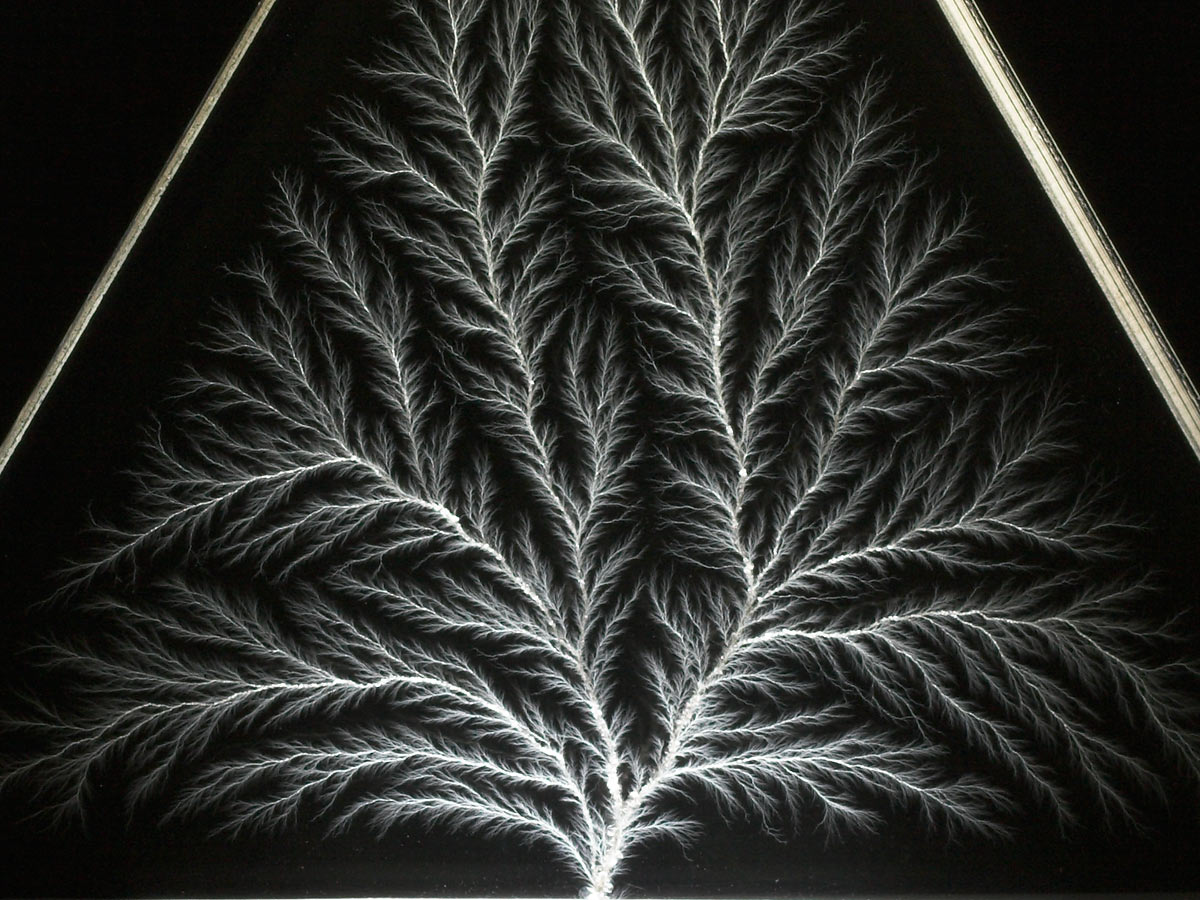
Lichtenberg figure detail

Close-up of Lichtenberg figure

It's been speculated that the feathery tips of the figure are present all the way down to the molecular level.

The world's premiere - actually, pretty close to the world's only - supplier of Lichtenberg figures burned into clear acrylic blocks is Bert Hickman's Stoneridge Engineering. That's one of Bert's in the video above, and I've bought a total of three smaller figures from him over the years, from his eBay store here. This equilateral triangle figure is four inches on a side, and cost me $US24.95 plus postage.

As acrylic Lichtenberg figures get bigger, the energy needed to make them rises, and is soon well beyond what your common-or-garden medical LINAC can manage. This sort of accelerator is not something you can make at home; it's very difficult to get even 1MeV out of a homebuilt unit, even if you're the kind of kid who is only bullied by the members of the football team who didn't know about all the jocks at your old school whose hair and teeth fell out before they died.

You need something like one of the big blighters used to irradiate food. This is why Bert's real monsters are rather expensive.

When high energy electrons hit acrylic, they don't just settle peacefully into the polymer matrix. They actually hit hard enough to discolour the plastic on the side on which the beam enters. This effect is known as "solarisation", because it looks not unlike the discolouration caused by long exposure to ultraviolet radiation (which only has energy of about ten electron-volts).

The electrons actually end up charging the plastic a bit beyond the discoloured deceleration zone. So if you look at an acrylic Lichtenberg figure from the side...
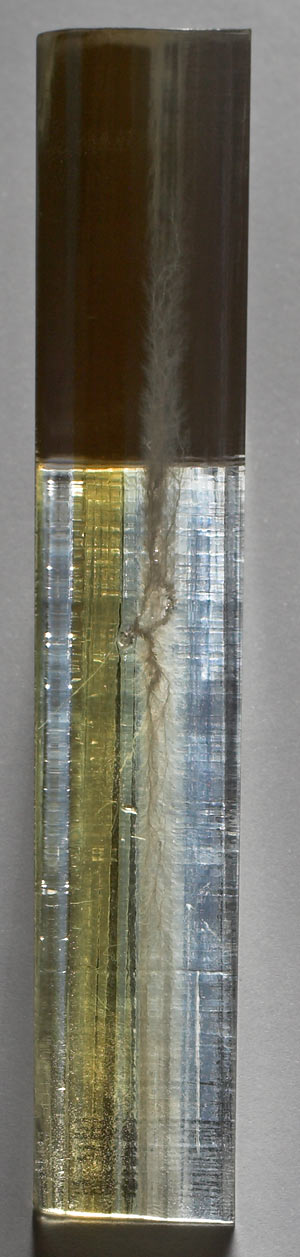
Solarisation of Lichtenberg figure acrylic

...you can quite clearly see the discoloration and the Lichtenberg figure itself as separate layers.

The solarisation nestles around the Lichtenberg figure like a little bathtub. It fades out around the edges, but those edges rise up around the lightning-shape on all sides.

And this is what I noticed when I was fooling around with my laser.

Shining the laser through the un-solarised part of the figure...
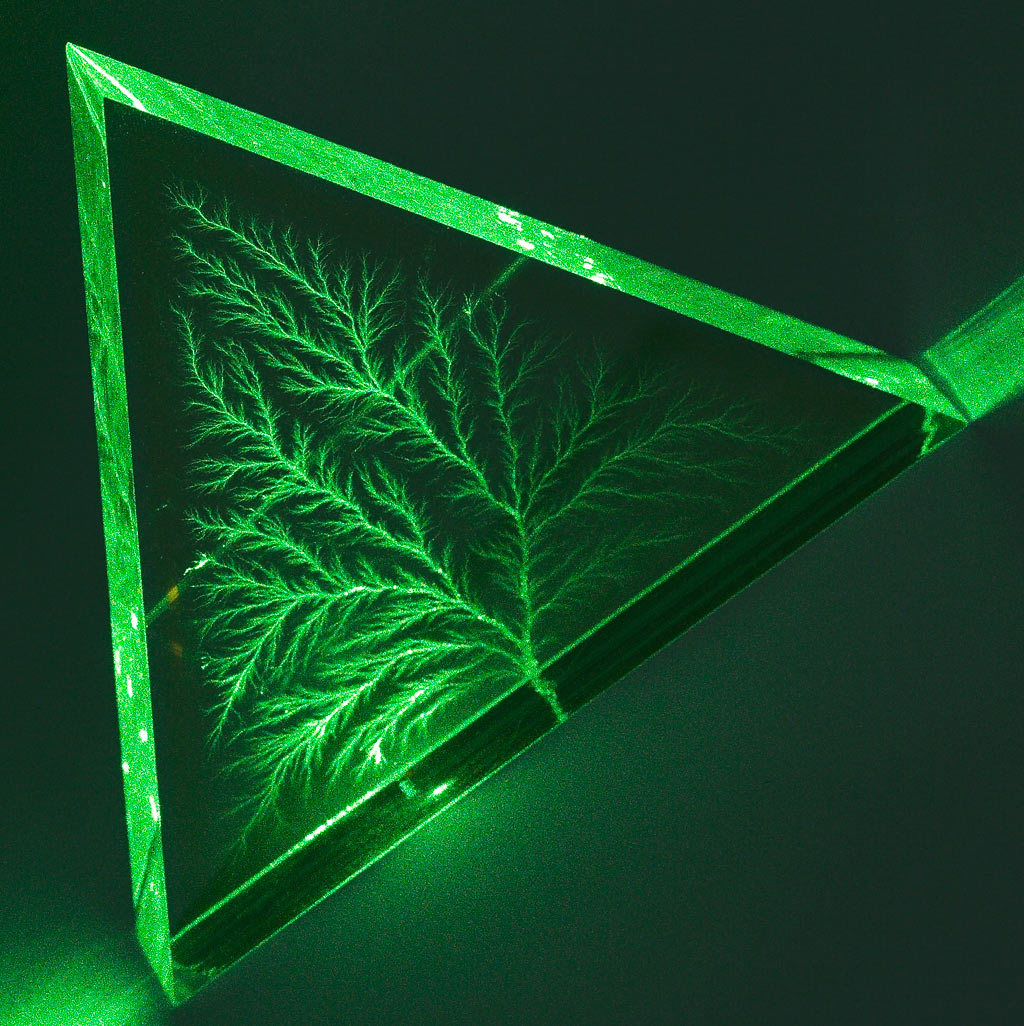
Laser beam through Lichtenberg figure

...produced pretty much the effect you'd expect.

But shining it through the solarised portion...
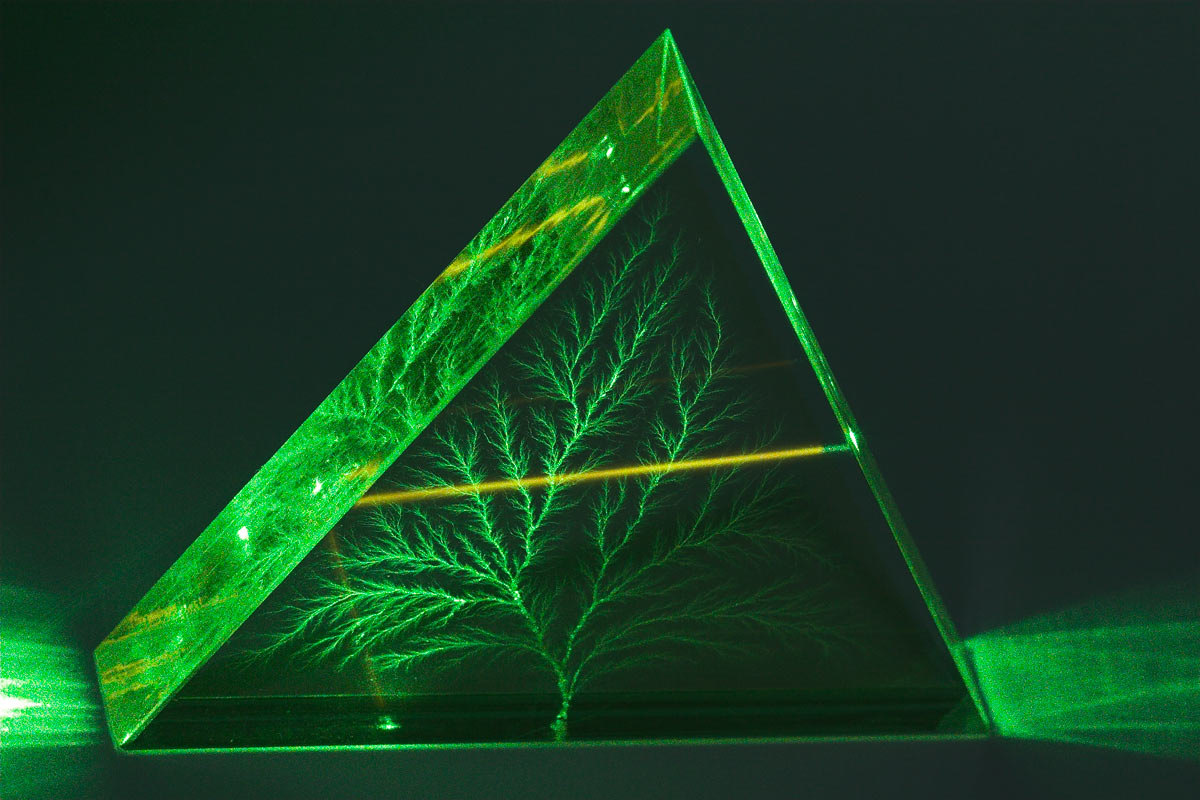
Laser beam through Lichtenberg figure

...gave a, much brighter, amber diffusion glow. You can see the beam turning amber as it hits the solarised portion of the plastic.

There's no great mystery about why the beam looks brighter in the solarised area. That seems to simply be because it's travelling through damaged polymer that scatters more of the light.
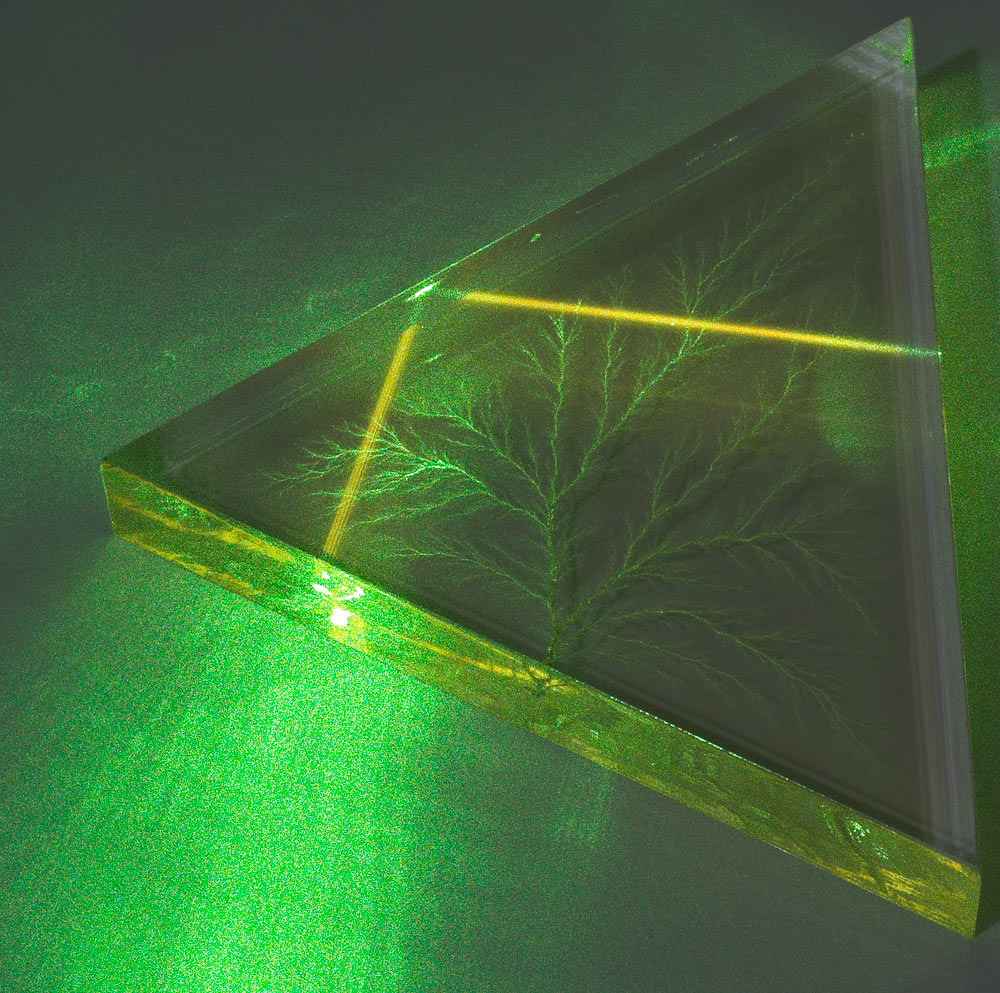
Laser beam through Lichtenberg figure

But the distinct amber colour was a surprise.

Only the scattered light is amber; the main beam's the same colour coming out of the block as it was going in.
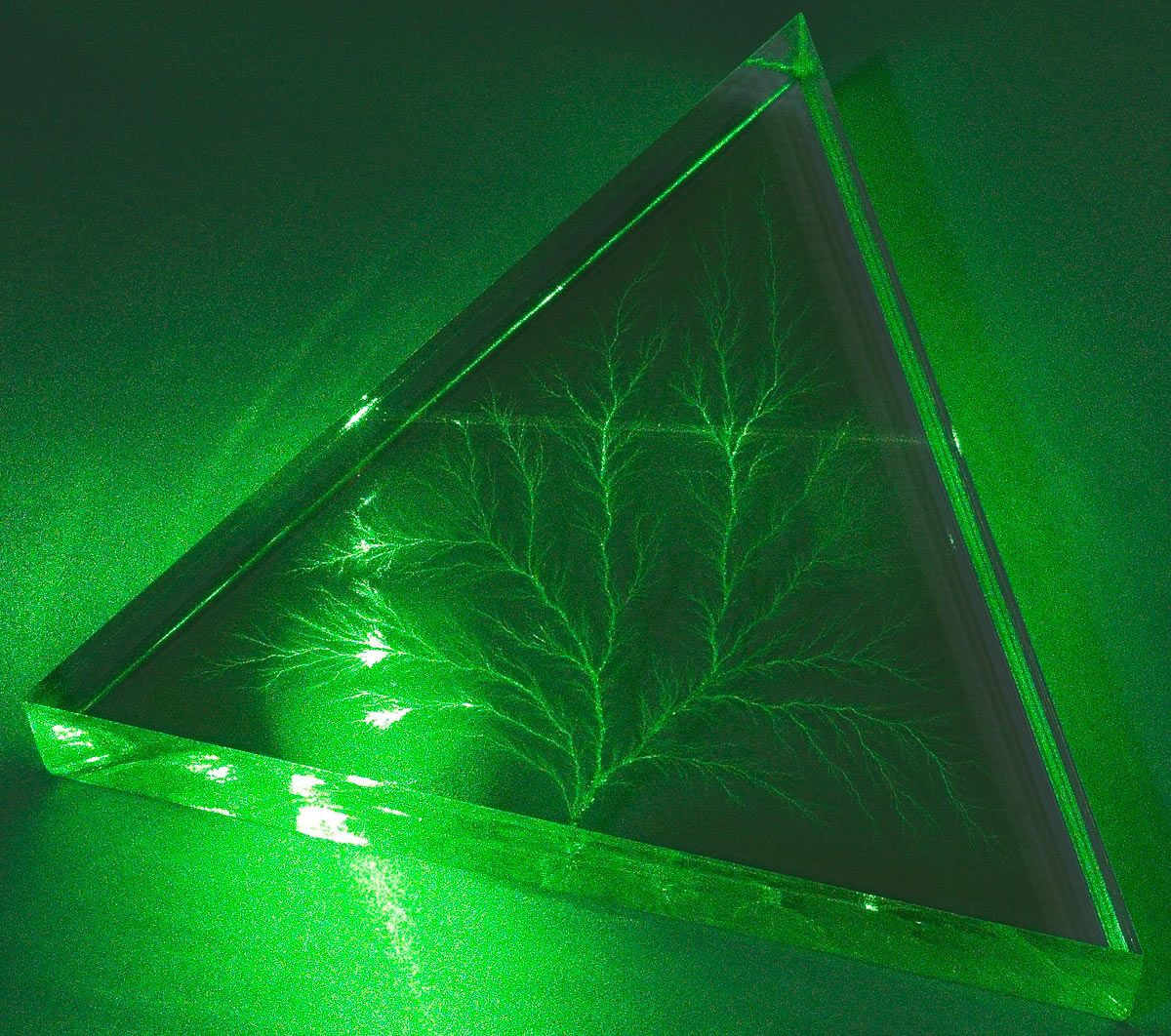
Laser beam through Lichtenberg figure

Here's the unsolarised side, again.

Another interesting thing about solarisation is that it heals. Over a few years, if you don't expose the acrylic to any more high-energy insults, the orange tint goes away.

The first Lichtenberg figure I bought from Bert was a little two-incher, which I purchased back in 2004. I can't remember whether it had visible solarisation when I got it, but it doesn't now - and a green laser beam stays green all the way through it.

UPDATE: Find some high-res video of acrylic Lichtenberg figures being made in this post!
God damn it

You know that DirectX problem, that I thought I'd fixed by buying a whole new video card?

Well, it looks as if what I actually need is a whole new computer. Isn't that great!

Yes, the problem is back again. Last night I watched a movie just fine; today I open a video file and as soon as I switch to fullscreen I've got three frames per second again, because DirectDraw acceleration has just turned its own self off again for no damn reason at all, and cannot be turned back on.

This is the way it always happens. It doesn't happen after I reboot, or after I install some particular piece of software, or in response to any actual change in the system configuration that I can see. DirectX acceleration just works one minute, and it doesn't work the next, and that's it.

From past experience, I am confident that rolling back to a previous system restore point, removing and reinstalling all video drivers, or even reinstalling Windows from scratch, will solve the problem for only a little while, at best.

I presume it's something wrong with the motherboard. Or something.

I don't need a new computer, I don't much want a new computer (more speed nice, lost day setting everything up again not), and I sure as hell don't want to pay for a new computer.

But since the memory and CPU in this computer won't work in a new one, I might as well get a whole new PC, lacking only a video card. Clearly, nothing else is going to fix this problem.

I feel stupid, contemplating a whole new computer just because a couple of graphics acceleration modes don't work on this one. Everything else works fine, and I can even cheat Direct3D into working, so I can play games if I want to. If I get a new computer, I'll be doing it just so I don't have to use crunchyvision low-res modes when I watch TV on my enormous monitor. How spoiled is that?

Kids are starving in Africa, et cetera.

God damn it.

Bug zapping

No video this time, but I have a provisional answer to the question I'm sure you've all been asking:

Can you kill an insect with a 350mW laser?

Well, I just managed to shoot a cockroach off the wall.

The bug clearly didn't like the beam on its body. It wasn't possible for me to hold the beam still enough to just burn the roach's head clean off (350mW will burn most plastic just about instantly, and is clearly powerful enough to incinerate a bug's head, but only if you hold the beam still on the target for a moment). But after I'd shot the roach for several seconds it fell off the wall, into the grasp of the rather intrigued cats.

(Who then probably juggled it for a bit and then lost it under the fridge, or something. They're not exactly killers.)

I don't think the beam had actually damaged the roach enough that it had to fall off the wall; I think its little flowchart brain had just decided that it was being exposed to fire, or something, and should therefore engage its emergency drop-to-somewhere-safer subroutine.

I await the arrival of a mosquito with interest.

e4b48fd541b3dcb99cababc87c2ee88f = elephant

This post on the Light Blue Touchpaper blog tells us all yet another thing we can do with Google:

Find a password, if our l337 h4XX0r skillz have already allowed us to harvest the MD5 hash for it.

The completely stupid way to store passwords, implemented by small children writing programs in BASIC and by $300-an-hour consultants writing enterprise software, is to just save all of the usernames and matching passwords as plain text in a file somewhere. If an attacker can read that file, they can now log in as anybody.

A much better, but still not as secure as it should be, method of saving passwords is to "hash" them using a "one way" or "trapdoor" algorithm, like MD5. A trapdoor algorithm runs very quickly in one direction (turning a password into an almost-unique string of seemingly random characters), but is almost impossible to run the other way, if you don't have access to cubic kilometres of sci-fi nanotech.

If someone gets hold of the file in which you store password hashes, the one-wayness of the hash algorithm means the attacker still can't figure out what passwords correspond to what hashes, and so cannot make use of his discovery.

Well, that's the theory.

In practice, attackers can take a dictionary of passwords, hash them all, then search for matches between their new hash dictionary and the password hashes. There are even helpful online tools that'll do it for you, like the long-established passcracking.com/ru, or md5oogle. When there's a match, you've got the password.

And this is what Google allows you to do in two seconds, if the password hash you're trying to "reverse" corresponds to a common word.

The word "elephant", for instance, hashes to e4b48fd541b3dcb99cababc87c2ee88f. Search for that in Google and you'll get a bunch of pages which, for reasons explained in the Light Blue Touchpaper post and its comments, often also have the word "elephant" on them, or right in their title.

(This post will probably be very high in those search results in a day or two. Check out the above-linked online reverse MD5 hash lookup tool if you'd like to explore other options - it lets you hash any string you like, then checks some databases for it. While it's checking, you can be Googling the same string. Md5oogle lets you generate MD5 hashes as well, but it converts everything to uppercase first - which many password systems also do.)

This technique only works for passwords that're common words - or, at least, have for some reason been hashed and stored in a Google-visible file. If your password is something nonsensical like dj347F, which hashes to 54041c87e2e431f3fc4c47e55d114ef3, the hash won't be found anywhere on the Web (except, again, on this page, once Google indexes it).

This technique also doesn't work if the passwords are "salted" with some extra data before being hashed. So if a user foolishly decides to choose "mypassword" as his password, the software actually hashes, say, 28391mypassword, and thus creates an un-findable hash.

Adding a simple fixed salt to every password still doesn't give you really industrial-strength security, but it's streets ahead of a lot of the junk that makes it to production. And it does stop dumb attacks like Google searching - well, at least until people find out that MurderDeathKill 3D's online gaming logon system just adds 28391 before hashing passwords, and start making tables of dictionary words with 28391 in front of 'em.

Lots of current popular software uses unsalted hashes, including the WordPress software that runs this blog.

So it's pretty lucky that I made my admin password "3hv78UEr", isn't it?

Fake marijuana botnettery continues

It would appear that the previously mentioned "herbal marijuana" business (which, as I explain in that earlier post, is probably actually just a scam to harvest credit card numbers) is burgeoning.

From: "Bud Shop" <dancitep_yzpsoy@gte.net>
Date: Fri, 16 Nov 2007 14:05:42 -0700
To: "dan" <dan@dansdata.com>
Subject: Smoke up the bud

Do You Smoke Big Buddha Bud Or Any Other Legal Bud To Go Crazy ?

http://shabaaloo.com

My buddy Mark stopped hanging out with me because he now works at the post
office and has to do a piss test every other week. Just last week though, i
see him sparking up. I'm like "Dude are you smoking bud again??" and he is
all "Yeah! i bought ONE POUND of Legal Bud at cheapestbuds.com and i dont
need to worry, this shit doesnt come up in piss tests and its some potent
shit!" cheapestbuds.com is too good to be kept a secret.

One warning though, Dont drive with this potent bud.
My friend blasted up before going on his mailing route and he ended up
crashing the postal truck LOL.
Oh and he still smokes up the Legal Bud!

http://www2.shabaaloo.com

OR

http://3I.shabaaloo.com

The shabaaloo.com site being promoted here looks exactly the same as the previous thebudshop.net. Note also the mention of "cheapestbuds.com", which was perhaps an earlier URL for the same scammers. That's dead now, but all of the other ones are still up. The "www2" and "3I" subdomains spread the botnet hosting out even further.

Once again, these sites are all shuffling from one home broadband IP address to another, a technique I now know is called "fast-flux", which was apparently originally used to hide spam mail servers. Their nameservers occasionally seem to be pointing more than one domain at the same IP address - both shabaaloo.com and thebudshop.net were at 69.141.166.10 (someone's virus-infected PC on a Comcast address) when I first checked. Mere moments later shabaaloo had moved to 75.22.25.116 (another zombie, this time connected via AT&T) and thebudshop had moved to 63.131.13.17 (Choice One Communications). Then shabaaloo was 82.10.184.121 (NTL Internet, a UK ISP) and thebudshop was 70.92.159.113 (Road Runner). The subdomains all have their own separate changing addresses, too.

Thebudshop's nameservers are still ns1.b4cf5f189.com and ns2.b4cf5f189.com; those are currently at 68.16.9.22 (AT&T) and 75.66.195.228 (Comcast), respectively. NS1 has stayed the same since I first checked four and a half days ago, but NS2 has changed at least twice since then.

The DNS entry for shabaaloo.com lists no fewer than five nameservers - four is the usual limit. It's got NS1 through NS5.b4cf5f189.com. As I said in the comments for the previous post, that probably makes it virtually invincible, at least by spam-site-hosting standards.

When botnets first hit the news, many people (me included) had some difficulty figuring out what they were for, exactly. Yes, you could use them to send spam, or to launch denial-of-service attacks, or as your own personal massively parallel supercomputer for cracking encryption or something. But none of those features sounded hugely marketable.

Bulletproof hosting for any site you want is different, though. There are plenty of people who already pay big bucks for that.

I think we'll be seeing a lot of spam-scam sites shifting to botnet hosting soon. Perhaps that'll be what it takes to get the major ISPs to start actually disconnecting people whose computers are part of a botnet. Thus far they've resisted taking such action, despite being urged to do so by such minor entities as the US Government for going on three years.

One might cynically surmise that the lack of action is because there's no money to be made in disconnecting zombies. Actually, there's money to be lost; even if all you do is direct all of the customer's Web requests to a "you've been quarantined" page with information about antivirus software, you're still going to get irate support calls that'll rapidly eat up every penny the customer's paying you. If you cut 'em off altogether, they'll probably tell all of their friends that you're a terrible ISP, and may file complaints with their credit card company. It's a nightmare.

And botnet members don't generally actually use a whole lot of the ISP's precious bandwidth, either. J. Random Hacker with his squeaky-clean computer that's downloading TV all day is the user an ISP really wants to cut off.

And if every ISP doesn't adopt a no-zombies policy, at least some disgruntled customers are not going to actually put their house in order - they'll just switch to an ISP that'll let their lurching zombie of a PC onto the Internet.

Here's a good article about the current sad state of affairs. Busting the people who set up the botnets seems to be the most promising course of action. That strategy hasn't exactly stamped out spam so far, though.

I know you're a liar paradox, but what am I?

Herewith, Wikipedia's surprisingly learned article about Opposite Day.

(When it was nominated for deletion in 2005, only one voter was concerned that the vote might in fact be happening during Opposite Day.)

More tales from the online Wild West

Everything old is new again. It's been years since I got any spam trying to sell me legal herbal smoking mixtures, but here they come again. But, this time, there's a lot more to the scam than meets the eye.

"Legal weed" concoctions seldom have any more actual effect than does snorting a fat line of baking powder. They invariably, however, have names that make them sound as if just opening the bag and taking a sniff would blow Bob Marley's head clean off.

This time, the spam's trying to sell "Big Buddha Bud".

Or, as I discovered when I searched for that string, perhaps it isn't!

It would appear that the Big Buddha Bud spams were, a week or three ago, promoting thebudshop.hk. That server had a protean IP address, shifting from one address that resolved to a home broadband provider to another, minute by minute if not second by second.

That could only mean that the site was being served by a botnet.

And that, in turn, probably meant that the site's only purpose was to harvest credit card numbers.

If, after all, you've got an online shopping site that can only be traced to countless virus-infected home PCs, why on earth should you bother actually sending anybody anything they've bought from you?

Thebudshop.hk is gone now, but thebudshop.net is alive and well. And its shifting IP address remains.

When I looked at it it a few minutes ago it was at 75.208.93.134, an address in Verizon Wireless's allocation. Then it changed to 76.188.169.229, which is a Road Runner address. Then it was 63.131.13.17; that belongs to ChoiceOne, a bank! And less than a minute later, it resolved to 76.15.25.162, an Earthlink address. And then 76.247.75.67, which is AT&T. I doubt any US ISP will be left out, if I keep on checking.

(If you manually point a Web browser at any of the botnet IP addresses, by the way, you get an interesting little page that says "Coming Soon! Please check us back later... Ddos Protection by the leet boys ;)". This is an interesting thread to tug on, if you're after more information on this particular botnet.)

I had no idea it existed until this moment, but it turns out that this "botnet hosting" is a known phenomenon. It's a brilliant idea, too! Why use your army of zombified home PCs only to send spam, when you can also use it to host the super-dodgy sites you're promoting?

Botnet hosting seems to have taken great strides, as well. Sites like this are supposed to be flaky, but thebudshop.net looks rock solid (not to mention professionally designed!) to me. This botnet seems to be delivering the kind of super-distributed redundancy that major Internet companies dream about.

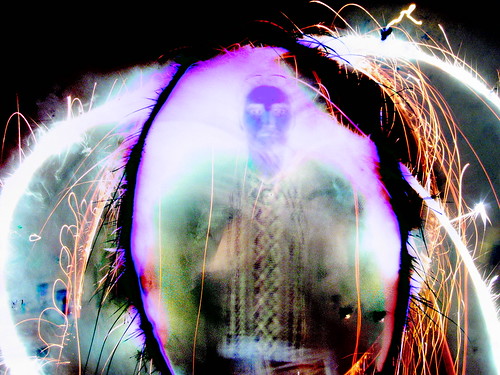
The transdimensional CCD

I'm listening, for the first time, to Louis and Bebe Barron's soundtrack for "Forbidden Planet".

Defective camera image

And then the MAKE blog lays this trip on me too.

...

I see now.

This world is not real.

The camera can see.

Let me help you see.

I will change you into the truth.