The Blogcruft Elimination Project

This post on the bitter and twisted Coding Horror alerted me to two significant problems with this blog.

I had a Useless Calendar Widget, and no way for readers to figure out who the heck I was.

Both fixed now.

I'm pretty light on the rest of the Web 2.0 bingo stuff, but perhaps your own beautiful and unique snowflake of a blog is not.

(And actually, I always figured that Phil Greenspun punctuated his writing with random pictures just to make sure that his readers never forget how many photos he's taken of naked women.)

The Strange Case of the Unfreezing Wine

A reader writes:

I observed something I consider strange. I had a bottle of white wine which I didn't drink all of, and I decided to freeze the remnants for cooking purposes.

I put a shallow rectangular container in my deep freeze. Into this I put a plastic bag to line the container. Into the bag I poured the wine, which I then left to freeze.

I expected the wine to freeze into a rectangular prism approx 5 by 10 by 1 cm overnight - BUT THIS DIDN'T HAPPEN.

When I opened the freezer the next day, the wine was still liquid! As I watched (over about 20 seconds or so), crystals began to form inside the wine until it began to form an icy slurry.

The wine eventually froze solid after 2-3 days.

My freezer temperature is unknown, but it will freeze meat and water in about six hours.

Why didn't the wine freeze over 12 hours?

Why did it crystallise when it came in contact with the warmer air?

Sorry, it's probably more a Dr Karl question.

Mark

The wine stayed liquid because there were no nucleation points on the plastic with which you lined the tray.

It's possible to superchill water below zero Celsius and have it stay liquid, if there's nothing in contact with the water that provides a seed point from which crystallisation can proceed. This is also how those spiffy sodium acetate heating doodads work.

YouTube is positively packed with people's videos of this phenomenon.

The classic version of the experiment is to super-cool, then tap or shake, a sealed bottle of water:

(This is one of those experiments that's easier to do if you live somewhere where it gets decently cold in winter.)

More advanced experimenters can pour the water out, to make "ropelike peaks":

And, just like the acetate heaters, freezing supercooled water warms up when it freezes:

You can do the trick with beer, too...

...which adds a nifty multiple-starting-point effect, I presume because the nucleation points are little CO2 bubbles popping in and out of existence when you tap the bottle.

It wasn't the warmer air that started the crystallisation going; a speck of dust probably fell into the wine. An ice crystal from one of the shelves of the freezer would have done it, too. Or just agitation of the liquid.

The reason why it took so very long to freeze completely was probably just because there's some alcohol in it. Mixtures of water with any significant amount of alcohol will never freeze in a very satisfying way unless you chill them quite a lot more than the average freezer can manage. Most beer has little enough alcohol in it that its freezing point is only a few degrees below zero, but non-fortified wine already needs about -10 degrees Celsius to freeze, and stronger beverages are lower again.

This is why "frozen vodka" stays liquid, but starts to look sort of oily, as the water in it tries to solidify but the alcohol stays liquid. 40%-alcohol spirits will freeze at about -27 degrees C. Domestic freezers usually only give you about -18 degrees C.

The Case of the Vanishing Icons

One of the great entertainments that awaits you whenever you reinstall Windows is seeing what new and strange personality features your fresh install exhibits.

It happens almost every time, and usually within days, or possibly even hours, of the reinstall; some weird thing arises that you've never seen before, even if all you've done is reinstalled the same version of Windows on the same computer you were using before.

Munged icons are a pretty common Windows problem - the OS messes up the pointers to its cached icons file, so each class of file or folder gets a semi-random new icon. But this new install of mine just came up with a variation on that theme which is a new one on me.

Munged icons

Yes, it munged the Quick Launch icons!

(In case you're wondering: No, none of those icons match the programs they're connected to.)

No problem, said I. I opened TweakUI and used its "Rebuild Icons" option, confident that everything would now be fine again.

Very munged icons

Instead, I got this. Now all but one of the icons is invisible!

More "Rebuild Icons" attempts caused the single still-visible icon to change, and more and more icons on the desktop to disappear.

Well played, Windows! Well played!

DirectX problem, how I loathe thee

Sometimes, your computer decides that you're not allowed to get any work done, or have any fun, today.
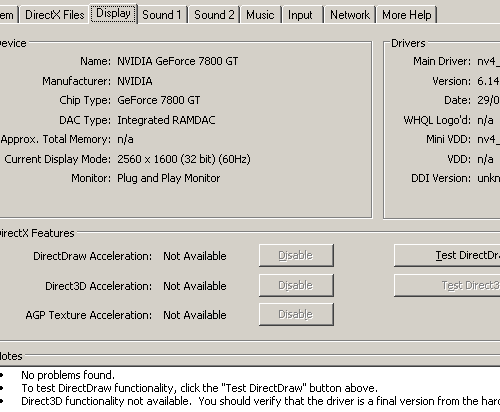
The new bane of my existence.

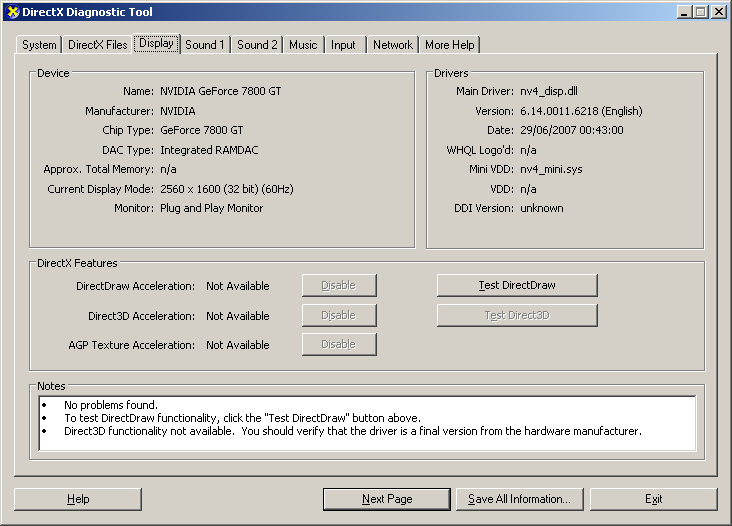
Mine did it to me today, by suddenly deciding (according to the DirectX Diagnostic Tool, dxdiag) that my graphics card had no memory and was not capable of DirectX acceleration of any kind.

Yes, as per Microsoft support document 191660, "The DirectDraw option or the Direct3D option is unavailable when you start Microsoft games for Windows".

The "Adapter" page in Display Properties (I'm running Windows XP) lists the right specs for my GeForce 7800 GT, but dxdiag believes there are "n/a" megabytes of memory on it.

This doesn't cripple Windows in general, but it means I'm not going to be playing any 3D games to speak of (OpenGL games still work fine, but most Windows 3D is Direct3D), or watching much video. Small-dimensioned video files play OK as long as they don't have to be scaled to a higher resolution; scale 'em up and the frame rate dives as the CPU begs for mercy.

I've had this problem once before. Then, I just had to run dxdiag, turn off whichever DirectX Features were still available in the Display tab, then close dxdiag and run it again, and turn all of the now-available-again features back on. Totally opaque for the everyday user, but a doddle when you know how.

Now, though, DirectDraw Acceleration, Direct3D Acceleration and AGP Texture Acceleration are all Not Available, and the enable/disable buttons for them are greyed out, no matter what I do.

(Needless to say, the DirectX Files tab in dxdiag says "No problems found"!)

And this is the way it is apparently going to bloody well stay, because I've been banging my head against it for more than six hours now, making no progress whatsoever.

I can get work done while the computer has this problem. If anything, it makes it easier to work, because I sure as hell can't play. But I have a hard time doing anything, including sleeping, if there's an unresolved problem like this dancing around in the back of my brain.

There's quite a lot of info on the Web about this problem, including some pretty freaky suggestions, most of which are mentioned on the Microsoft page.

Herewith, the list of Things I've Tried:

I've reinstalled the graphics and motherboard drivers, and the latest version of DirectX 9, multiple times. Yea, multitudinous have been the reboots.

I've cleaned out the old Nvidia drivers with Driver Cleaner Pro (previously mentioned here) before reinstalling them.

(Oh, and yes, "Hardware acceleration" in Display Properties is set to "Full". I've tried setting it to None and then back to Full, too.)

I've tried the weird-sounding suggestion to enable, then disable, Remote Desktop Sharing in Microsoft NetMeeting, because the sharing feature apparently blocks Direct3D, and cycling through it can perhaps cancel some other application's similar block.

I've disabled the Terminal Services service, which I don't need anyway.

I've uninstalled my monitor in Device Manager and rebooted, even though this particular piece of voodoo is only at all likely to work if you're removing phantom monitors from an extra graphics adapter, like an integrated motherboard adapter that you're not using.

I've reinstalled Windows over the top of itself.

(Actually, the first time I did that I accidentally told Windows the wrong drive, picking the other one in the system that's the same size as the actual boot drive. So I created a shiny fresh copy of Windows that I didn't want. That was thirty minutes I'll never get back - though I didn't bother installing graphics drivers in the new Windows. I suspect that DirectX would then have worked, but who knows?)

I've restarted the computer with a "clean boot procedure", by using the System Configuration Utility, msconfig, to skip all startup items and non-Microsoft services.

(This, entertainingly, showed me that msconfig does not consider Windows Defender to be a "Microsoft service".)

I've turned off "Enable Write Combining" in Display Properties and rebooted. And then turned it back on again. And rebooted.

And, the last option on the Microsoft page: I created a new user account.

The Microsoft page doesn't tell the hapless troubleshooter what to do with the new account, mind you. It just tells you to make it, and... wait for its healing energy to permeate your computer's chakras?

I presumed that I was actually meant to restart and log in as the new user, so I did that. But it of course did not help.

Next, the Microsoft support page points you to another Microsoft support page, "How to troubleshoot display issues in Microsoft games". But that contains nothing helpful, either.

(I love how Microsoft's pages always mention "Microsoft games" in particular. That's not really a good PR message - it suggests that other DirectX games might work fine, but ones from companies owned by Microsoft wouldn't.)

I've even visited the More Help tab in dxdiag and then clicked the DirectX Troubleshooter button, with the mad hope that this might be the first instance in human history of a Microsoft Troubleshooter actually shooting some trouble.
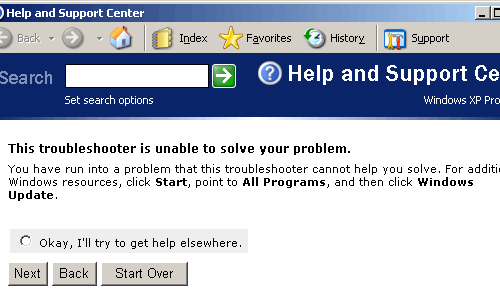
How Windows troubleshooting wizards always end.

So much for that.

All of this screwing around has messed my Windows installation up a little more than it was before. There was one incredibly bizarre problem, now resolved, that I'll leave for another post, and all of my icons are of course bunched up on one side of the screen because layout.dll has forgotten where they were.

Oh, and ACDSee now has a great error:

Groovy error.

But the problem remains.

If Web pages about this are anything to go by, this problem can be a bit like lower back pain; it makes you suffer for a while, then just goes away as mysteriously as it came, when you reboot for some other reason. I've made a frickin' hobby of rebooting today, though, and the problem ain't gone away yet.

The only option left, as far as I can see, is a proper nuke-from-orbit Windows reinstall from scratch. (I suppose I should have kept the accidental install on the other drive, instead of deleting that Windows directory when I got back to booting from the proper drive. Oh well.)

That'll mean losing most of the system setup stuff I've done over the last year and a half of largely trouble-free computing, which is not that big a deal, of course.

But it's ludicrous to have to do that just because Windows has arbitrarily decided not to let the graphics card accelerate anything any more. It's like having to reinstall Windows because it's decided to not let you use anything above 640 by 480, or because the audio "mute" box is permanently checked. It feels like buying a new car because the horn doesn't work in your old one.

(And yes, I have been tempted to use this as an excuse to get a whole new computer. Mmmm, quad core...)

I've swapped e-mail with a fellow who works at Nvidia; I'll drop him a line and see if he's got any ideas. I also invite you all to contribute your own hare-brained schemes in the comments.

I will, of course, also update this post when the problem's fixed, whether by diplomacy or the nuclear option.

[UPDATE: Yeah, I reinstalled Windows. Latecomers haven't missed all of the fun and games, though; check out the comments!]


Exactly as magical as all of the other ones

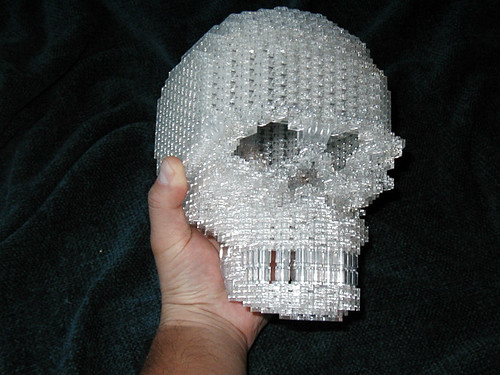
Lego crystal skull

Here's something you don't see every day.

Crystal skulls aren't the hip new thing in parapsychological woo-woo any more, but they were very big back in the heyday of documentaries narrated by Leonard Nimoy.

Why spend all the time carving and interminably polishing one, though, when you can make one with exactly the same mystic powers out of a buggerload of 1x2 clear Lego plates?

(Lugnet announcement post with a little more info here.)

Pay no attention to the man inside the oil barrel

MGS 4 screenshot

Frankly, this enormous Metal Gear Solid 4 gameplay demonstration video (Australian direct download link for iiNet customers here) would be quite hilarious even if it weren't for Snake's incredibly-well-defined buttocks.

But they, and the little dancing robot, push it to a whole new level.

Hideo seems very serious about it all, but I've no idea what he's actually saying (beyond stuff like "aru-P-G" as he whips out an antitank launcher...), so I can't be sure. I presume there's a simply excellent explanation of Snake interrupting his murderous pursuits to check out a girlie mag.

My new fake address

Nerds the world over often find themselves filling out online address forms with nonsense data.

Perhaps you're making a free account at some newspaper that doesn't have any entries in Bugmenot. Perhaps you're trying to download drivers for your old scanner. Perhaps you're registering some product you actually did just buy, but not on the understanding that you'd agree to sign up for junk mail.

A large subset of the sites dumb enough to request personal information from people who'd rather not give it are also dumb enough that they only accept US addresses, with five-digit postal codes. And, heck, if you're entering nonsense data anyway, you might as well leave everything set to defaults, which almost always means a US address.

If you actually live in the USA, you can just declare yourself to live at 123 Foo Street in the suburb and zip code where you actually reside. If you don't have such information at your fingertips, though, you have to come up with something.

The result of all this is that the raw data pouring into marketing databases the world over contains a disproportionately large number of people who say they live in Beverly Hills, California. Because even if you never watched the soap opera, you probably still know its name. And that name, complete with handy zip code, constitutes the only US postcode that most people around the world, from New Zealand to Iceland, can think of.

You can just type random digits into the postcode box instead, of course. But then you hit those fabulous sites that check to see if the postcode is valid, or even whether it's valid and matches the string from the "town" box.

So 90210 it is, for nonsense-enterers the world over.

But I, for one, am moving my database-polluting 97-year-old Ecuadorian-born Jewish grandmother alter ego out of boring old Beverly Hills, and into Compton. Compton's zip code is easy to remember: 90222. And "Compton" is faster to type, on those tiresome occasions when you have to.

And, of course, Compton is cooler.

Motorvation

The first article I ever read on the most excellent Evil Mad Scientist Laboratories site was their one on how to build a homopolar motor.

Go there. Check it out. Build one. It's ridiculously easy, and it works remarkably well. And, unlike some other unlikely motor designs, it's unlikely to rip skin off your thumb and then become red hot.

Unsurprisingly, homopolar motors have become something of a GooTube phenomenon, and there've been some innovations.

The Evil Mad Scientist version of the motor has four parts; one battery, one screw, one magnet, one bit of wire.

This can be reduced to three parts by making the magnet static and turning the wire into the rotor:

The "roller" variant.

An elegant spiral version.

The screw type, turned upside down!

Balance this one properly and it could be quite impressive. Using hard disk components is definitely a good way to start.

This one's quite imposing, though the timidity of its operator suggests it's not very well balanced, either.

OK, now this is just showing off.

Before this newfangled fad for homopolarity, there was another "world's simplest motor" that also needed only three components, if you chose those components carefully (it's mentioned on the Evil Mad Scientist homopolar page). Kids who want to get a solid C on their science project can buy a kit to build one.

The old "World's Simplest" motor is considerably more complex than the homopolar motor, but it's also much closer in design to a standard commutated DC motor.

Here's a home-made one in action:

And here's how to make one: