
Also: Here are some tentacles.
And, furthermore: The Tank-Pod!
The cool kids appear to have moved on from the separate season torrents for The Secret Life Of Machines/The Office (previously), and are now sharing an all-in-one torrent. You can get it, for instance, here. If that one's dead now, hit ScrapeTorrent or something to find it.
The all-in-one torrent contains the exact same video files, so there's nothing new to see here if you've got these ordinary-but-watchable rips already. If you're at 86% on one of the other series and are wondering what happened to all the seeds, though, here's your answer.
From one of my recent favourite sites (the homopolar motor's a classic), there's now this response to the subject of yesterday's post:
Dry ice can be had from various places. The Evil Mad Scientists apparently got theirs at the grocery store, but industrial gas suppliers, catering joints, ice cream wholesalers and so on can be useful if your grocery store ain't that hip.
Hit the phone book - suppliers of water ice may sell dry ice too, and should know where you can get it if they don't. It'll keep for a while if you put it in an unsealed (that's important) cooler/Esky in your domestic freezer (and probably save you some electricity, since it'll keep the freezer cool all by itself - dry ice is a useful emergency measure if you've got a broken fridge full of valuable food, or there's a lengthy power outage, and aberrant cables are not an option).
All the dry ice is for, in this case, is the creation of a blanket of cold carbon dioxide. So it's conceivable that you could substitute in some other CO2 source. A welding CO2 tank set to just trickle the gas out, for instance, or a similarly restricted fire extinguisher (CO2 extinguishers can also be used to very wastefully make a little pile of dry ice, as can be seen in one of the Secret Life of Machines episodes).
Or even, possibly, ye olde bicarbonate of soda and vinegar.
Don't expect a little soda and vinegar to make enough CO2 to be useful for this trick. But a whole kilo box of bicarb in the bottom of a bucket, with a couple of litres of the supermarket's finest, cheapest white vinegar dumped on it, might do the trick. Ice cubes to cool the gas and encourage it to make an orderly layer may or may not help further.
The soda-vinegar reaction can also be used as a pressure source to power rockets.
Add a giant wobbly solar bag (which is filled with air, not CO2), and you've got a grand day out.
A reader suggested to me that this demonstration of the density of sulfur hexafluoride gas was cool.
I concur.
(As normal for gases denser than air, talking with a lungful of sulfur hexafluoride does indeed make your voice deeper, the opposite of the "helium effect". Been there, done that.)
Some more from the Bonn Physics Show:
This is essentially the same principle as is used by thermal lances.
Note the pale blueness of liquid oxygen. And the gratuitous use of the Terminator theme.
On the subject of unlicensed music...
...nerds will be nerds.
Find more, including a bloke in a Faraday cage, the Doppler effect demonstrated by swinging a speaker around your head, a liquid nitrogen bomb, hydrodynamic propulsion and the good old ping-pong balls and mousetraps, here.
A reader asked me what I thought of Nokia's N73 and Sony Ericsson's K800i, two fancy mobile phones with autofocus 3.2-megapixel cameras in them, which make them quite different from the awful crunchy fixed-focus phone-cams of old.
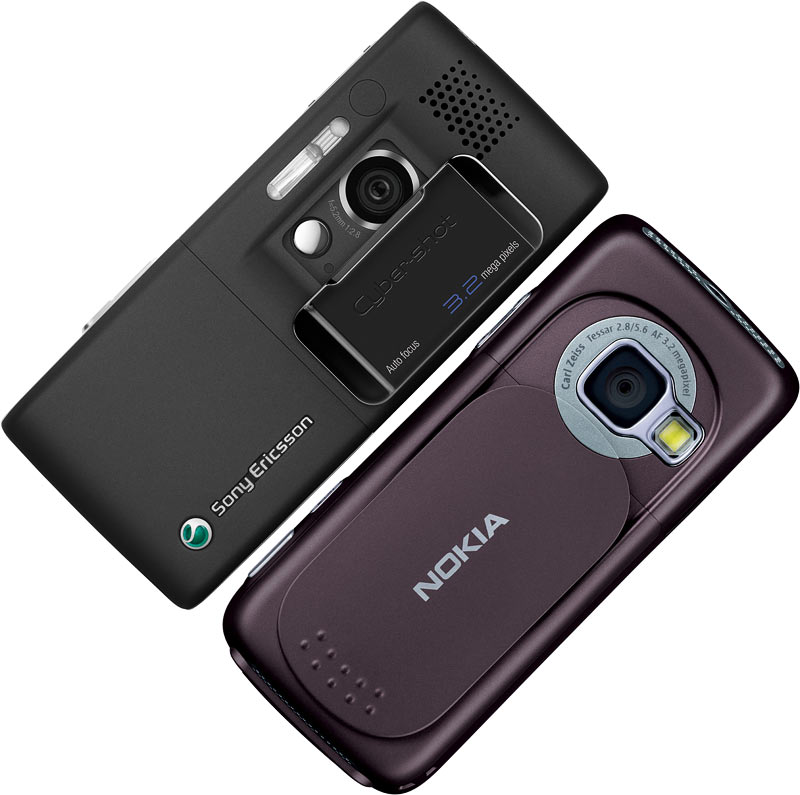
(Note: Picture not to scale. I just stuck two press photos together.)
I can't honestly say that I can recommend either of them.
I thought they both looked pretty decent when I started writing this, and I still agree that they're better than run-of-the-mill cameraphones. But I think you'd have to place an unreasonably high premium on single-unit integration to make them really worth having - especially considering how much they cost (immediately when purchased outright, or eventually in service fees).
This isn't to say that either of them are rubbish, though.
Most of the sample pics I can find from the N73 look OK. There are some problems, though. The N73 doesn't seem to have a huge amount of exposure latitude, so you get blown-out highlights in a lot of pictures:




(Click through to the larger versions to see what you're meant to be paying for in these more expensive cam-phones.)
When there's less image brightness variation to worry about, though, it's quite good:

Note that it's doing the standard consumer-camera thing of punching up colour saturation in every image...

...which can sometimes combine with exposure problems in unfortunate ways:

...but, by and large, it seems to be up there with lots of OK cheap compact digicams.
Except for the lack of optical zoom, of course.
One other pitfall in many consumer cameras is that they have lousy light-gathering ability - a high minimum F-number. Since small-sensor digicams also can't do high ISO settings without lots of noise, this can matter a lot for many ordinary medium-to-low-light situations, including most indoor photography.
Nokia don't seem to even publish the F-number for the N73's lens, which is extremely remiss of them; I had to look at the press photo of the lens to read the "2.8/5.6" from around it.
I presume that means it can do f2.8 wide open and f5.6 with an aperture reduction doodad switched in, and that's it. That means max aperture f2.8, focal length 5.6mm (real focal lengths for small-sensor cameras with reasonable field of view are very small; that's why they're usually specified in the marketing bumfodder with "35mm equivalent" focal length specifications, which leave purchasers mystified when they notice that the lens itself has some tiny number printed around it.)
F2.8 is OK, but it means that non-flash indoor shots, even during the day, will be grainy, blurry, or possibly both.
On to the K800i, which gives some great examples of this.
Its F-number is a freakin' secret, too. Again, I had to turn to press pics to find it. F2.8, again (that's what the "1:2.8" around the K800i's lens means).
I'm being careful not to make snap judgements from Flickr pics, because people may have processed them poorly or fiddled unwisely with camera settings. When cameras only have digital zoom, though, it's possible to make truly awful pictures by using lots of said zoom.

Dear god.
Ignoring those sorts of pictures, there are plenty of decent K800i pics, too.
This is pretty good - not horribly crunchy or blurry:

Mildly blown highlights, but they're no biggy.
Here we go again with the highlights, though:

And look at the crunchy stuff and noise reduction artifacts in this, when you view the larger versions:

Then again, this is quite good:

Again, it's got unnaturally high colour saturation (though the reason why consumer cameras do that is that people like these "punchy" results out of the camera, even if they throw detail away), but there's only a little blue fringing on the high-contrast edge at the top of the building, and no horrible distortion or sharpness loss at the edges.
But then again, look at this.

It was obviously not dark when this picture was taken, but look at the big version and you can see that all of the fine detail has been "watercoloured out" by noise reduction, because the camera decided it needed to keep its shutter speed up by cranking the ISO (the EXIF data says only ISO 80; if that's the truth then something really awful is going on...), and then noise-reduced the result.
And bang, there goes most of your resolution.
You can get lost in all the technical bulldust about cameras and ignore the fact that the above picture really is a very good photo, which you unquestionably would not be able to take if your phone was just a phone and that was all you were carrying.
But when your camera deliberately destroys most of the detail in the pictures you take, leaving you with something that can't be printed any bigger than an old 110 negative without looking strangely flat, you may still feel ripped off.
And when there's no zoom, this is more important, because you'll be cropping pictures more often. (The digital zoom crops the picture for you, of course.)
Regarding the deadly combination of low ISO sensitivity and high F numbers, check this out:

It's a daylight shot (unless I, and the camera time stamp, am very much mistaken), but the camera still went to ISO 200 and 1/13th of a second for it, and as a result created a blurry mess.
This comparison figures that the K800i is more like a real camera than the N73 or N93, but their example pictures are pretty bloomin' ordinary. They're what I'd expect from a good compact camera in 2001, at best.
Overall, the most I'd pay for the camera portion of either of these cam-phones, in today's market, is $US100. OK, there's the one-device convenience factor that might make the camera worth much more to you - but you can buy really excellent compact cameras for $US300, these days, and the over-the-counter price for the K800i is, what, $US500? The Nokia's not much cheaper.
Given that there's an embarrassment of choices in the ultra-compact-under-$US200 market sector these days (go nuts with the DPReview comparator...), I really couldn't justify paying any significant premium for a camera of the quality of the ones in these phones.
I mean, you can pay less than $US200 and get a Panasonic Lumix DMC-FX8 (combined review of it and its siblings here) these days. That's got not only real zoom, but also a proper optical image stabiliser, not just one of those phoney baloney high-ISO modes, which Sony brazenly try to palm off on you with the K800i.
Yes, these cam-phones do beat the hell out of old-style fixed-focus cameraphones with no flash, plastic lenses and webcam sensors. But so does a Box Brownie.
I cannot recall previously encountering a game promo video that used one of the famous "In A World" voiceover artists.
The reason for that is pretty simple, of course. Don LaFontaine and/or Hal Douglas (I'm not enough of an expert to be able to tell them apart) are expensive, and most games cannot even pretend to have enough gravitas to justify one of those Overblown Voice-Overs.
OK, sure, maybe an RPG or a big-ass space shooter could pull it off, but this is "MotorStorm", which doesn't even appear to have guns in it. It's just a very pretty off-road racing game for the PS3.
But, nonetheless, it would appear that "In this ageless valley, a new breed of warrior has been born." Et cetera.
Don and Hal have done better work.
On the off-chance that you haven't seen it, here's Don and everybody else who's anybody in the movie trailer voice industry except Hal:
And here's Hal:
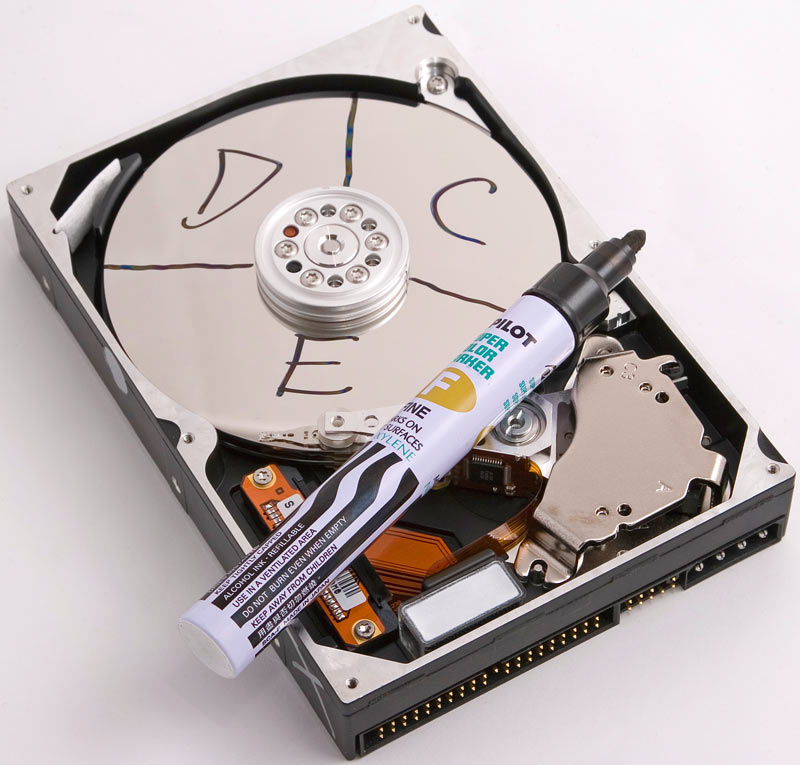
Yes, I am pleased to learn of Hitachi's plan to release probably-functional "one terabyte" hard drives Real Soon Now. They'll probably work fine, the price is good, it's like Bigfoot or Jesus. Huzzah.
This is, however, a good time to mention that now that consumer hard drives are nudging the "1Tb barrier", the capacity rip-off factor is about to become worse by a factor of 1.024. Again.
As I and others have written many times before, storage manufacturers are, almost without exception, in love with specifying their devices as if a kilobyte is 1000 bytes, a megabyte 1000 kilobytes, a gigabyte 1000 megabytes, and (now) a terabyte 1000 gigabytes.
According to the standard SI prefixes, this is exactly true. There are one thousand grams in a kilogram, after all.
In computer usage, though, those SI prefixes are perverted to refer to powers of two, not ten, despite the so-far-unsuccessful effort of the standards organisations to get everybody to call the computer capacities "kibibyte", "mebibyte" and so on.
So a real kilobyte, as used by every desktop computer operating system, contains two to the power of ten, 2^10, 1024, bytes. A real megabyte contains 2^20, 1,048,576, bytes. A real gigabyte contains 2^30, 1,073,741,824, bytes. A real terabyte contains 2^40, 1,099,511,627,776, bytes.
As you can see, the difference between the powers of ten and the powers of two - the rip-off factor, in other words - gets worse and worse as capacities rise. Once you get to the terabyte level, the factor is very nearly 1.1.
There can be a further loss of capacity from the space taken up by formatting data - the metaphorical painting of the lines on the parking lot. But that varies with the filesystem you use, and the actual raw capacity you get from a drive with sticker capacity X varies, too.
That capacity is never high enough to cancel out the 1000/1024 rip-off factor, but it often is enough to account for the space taken up by formatting. The "320Gb" Western Digital drives in my current computer do indeed format to 298Gb, exactly what you get if you divide 320 by 1.024 three times. That's thanks to an extra 67-odd megabytes of space, which cancels out the formatting losses. They're still nowhere near 320 real formatted gigabytes, though.
So even if the new "one terabyte" drives are similarly generous, you can only expect them to format to 909 - maybe 910 - gigabytes 0.91 real terabytes, which is 931 real gigabytes.
So, OK, maybe not technically ninety gigs down the toilet. Maybe only 69, depending on which way you look at it.
Either way, that's a lot of $US5000 18 megabyte Winchesters. And there are still plenty of hard drives on the retail shelves that don't hold as much as this new one will rip you off for.
So, until someone starts selling a "1.1Tb" or larger drive, the true 1Tb barrier for single drives will not be broken.
The mismatch, of course, may be getting worse, but it arguably matters less and less, as the price per megabyte of hard drives continues to fall.
But that doesn't mean that people in the year 2020, or whenever, won't feel fleeced when their new "1Pb" drive only formats to a lousy 888 909 terabytes.
Coincidentally, two people just e-mailed me about two different kinds of glasses that're meant to make using a computer a less eyestrain-y experience.
First, the ones that might work. Second, the... other ones.
At the inventively-named EyeFatigue.com, you'll find $US24.95 specs that are, essentially, reading glasses. Mild lenses that make it easier for your eyes to focus close, and which will probably give you a headache if you wear them at other times.
This seems sensible enough to me; computer use is pretty close work, and focussing close for a long period of time, even if your eyesight is perfect, will indeed give you eyestrain. Glasses that turn your long focus into close focus can help, here, once you adapt to the fact that your eyes feel as if you're looking further away than you are.
The Eye Fatigue site also reassures me with its lack of pseudoscientific bulldust, and firm instructions to actually get a proper prescription - with separate measurements for each eye - before ordering, if you know what's good for you.
I Am Not An Optometrist; there may be something horribly wrong with this that I haven't thought of. But it doesn't look too freaky to me. Close-work glasses are generally useful things, and these look like well-thought-out ones to me.
Now, on to the fun ones.
I got a letter as follows:
I recently came across a web post by an elderly gentleman complaining of "frequent conjunctivitis, dry eyes, hard crystals in the inner corners, etc" when he uses his computer that go away when he goes on holiday. Looking around the web he found MelaOptix glasses from the Melanin Vision Center as a possible cure to the problem.
Are they on the level or is it another case of fuel line magnets, cure every disease in the world pills, or wooden volume knobs that make your stereo sound 10X better?
Lastly, he also posed this question:
"Is an LCD screen free from "bad" radiation, that is high-energy (HEV) sight-damaging stuff, in comparison with CRT?"
Could you comment?
Rob
My first guess was that the gentleman's problem was happening simply because he's focussing his old eyes on something close for long periods of time, probably blinking less, and possibly also looking upward a bit (dust in the eyes, more evaporation from their surface), or into a breeze.
(And the gentleman may go on holiday to somewhere with higher humidity than his computer room, too.)
People can become very uncomfortable without noticing while performing any engrossing task, and computer use definitely qualifies. Many people have suddenly realised, while playing a game, that they're freezing cold, very hungry, and desperately need to pee. Staring until your eyes are bloodshot is the same sort of deal.
Many people also set their monitors too bright. Modern screens, especially LCDs, have very high maximum brightness which is only necessary if you're competing with a brightly-lit room. Your monitor should, ideally, be no brighter than a sheet of paper in your lap.
For many consumer monitors, maximum contrast and zero brightness is a good setting. If you do that, and can then (just) see all of the gradations in one of those black-to-white gradients, you're pretty much done. If the darker colours blend together, you'll need to tweak the brightness up a bit.
Monitor calibration can get a lot fancier than that, but Contrast 100, Brightness 0 often gets you more than half way there.
(Oh, and set the refresh rate properly, too.)
My considered opinion of the MelaOptix glasses is that they're a bunch of bollocks. The only thing they don't do is the one thing that could actually help - aiding close focus. All of their other features are pointless, at best.
"Melanin" is a term that covers several pigments, not just the biological one they want you to think they're talking about. Even if they're actually bothering to put biological melanin in their glasses, though, there's no reason to suppose it does anything special.
Yes, orange-ish lenses can make things seem a lot clearer, especially in glary outdoor situations where stopping a lot of blue light will help young eyes see, let alone old ones. That's why ski goggles are so often orange. But there's nothing magic about any particular exact flavour of brown-orange pigment, no matter what those Blue Blockers infomercials say.
The Eye Protection Factor the Melanin Vision Center mention is, as far as I know, just talking about ultraviolet light. Given that (a) even cheap sunglasses these days commonly have very good UV blocking and (b) computer monitors produce no UV (they've got narrowband red, green and blue phosphors - that's it...), I believe the Melanin Vision Center are being deliberately misleading about the qualities of their products.
Since computer monitors already allow you to change their brightness and (unless you've got a rather old one) colour temperature, though, anything sunglasses could do for you can also be done with the monitor controls. And turning the screen brightness down makes CRTs live longer, too.
There is no reason for normal humans to wear sunglasses indoors unless, of course, they're doing it to look cool.
Regarding "bad" high energy visible radiation - neither LCDs nor CRTs emit such radiation. The broadest definition of HEV includes everything down to 530nm wavelength, which is green, so technically the green and blue phosphors do emit that kind of HEV, I suppose. But they ain't nothin' compared with the blue sky, which is not generally regarded as all that terrifying.
Some old CRTs genuinely do emit quite a bit of never-proven-to-be-harmful radio frequency energy, but they emit it from the back of the casing where the high voltage stuff is, not from the front. Old monitors, and some other gear like laser printers, also produce significant ozone, which is bad for your lungs if it's concentrated enough that you can smell it - but which is only even slightly worrying, in real world terms, if you're chronically exposed, like the poor dude with three laser printers blowing warm air into his cubicle.
If CRTs were made out of ordinary glass, they'd also emit a lovely drizzle of soft X-rays. To stop that, they're made from leaded glass, which eats all of that radiation.
You can still get a nifty static electricity crackle from a CRT monitor, which alarms some people. But that is also perfectly harmless.
So, in conclusion: Properly calibrated prescription reading glasses? Possibly useful for computer users. Cheap off-the-shelf drugstore reading glasses? Quite possibly much better than nothing, for people who have trouble with close work.
Goofy melanin shades that claim to protect you from radiation that monitors don't even emit? Save your money.
(It should also be noted that the melanin glasses cost more than three times as much as the non-fraudulent ones...)