My very own digital pepper-mill

You know those people who gloat insufferably about how they were in a junk shop in Chickenmilk, Wisconsin, and they found a 1933 Leica or Amazing Fantasy #15 or something for $5, and aren't they clever?

Curta calculator

Well, I scored myself a Curta calculator for forty Australian dollars.

And yes, it was in a junk store, next to the usual random collection of broken cameras and mildewed binoculars.

(When the junk shop owner names a price and you immediately smile broadly and say "Sold!", they know they've screwed up.)

Mine is not an incredibly collectable Curta. It's a Type I with serial number 67087, which makes it an early 1967 unit, with plastic crank and storage case but (slightly unusually, I think) a metal "clearing ring".

Unfortunately, the actual finger-loop part of the clearing ring - the part that adds an element of hand-grenade-ness to the otherwise pepper-grinder-ish look of all Curtas - is broken off...

Curta calculator fisheye

...perhaps because it sticks out when you don't swing it into the stowed position.

And there's no manual either. But it's still easy to twirl the top around to clear the readings, and everything else (including the carrying case) is in excellent condition. It's in perfect working order and clean as a whistle.

Intact Curtas regularly go on eBay for $US700 or more - they're somewhere between slide adders and Fuller Calculators on the mechanical-calculator-collector expense scale (I don't think Enigma machines really count).

So I reckon this still has to be a $US500 item, at least.

(I'm not itching to sell it, but if you're willing to pay top dollar, especially if you're in Australia, let me know.)

The actual practical value of a Curta calculator today, as opposed to its collectible value, closely approaches zero. It's not actually very difficult to use a Curta - for basic calculations, at least. But, like books of logarithms, Curtas have been made about as completely obsolete as is possible by electronic calculators.

Pretty much any electronic computer at all is hilariously superior to the finest hand-cranked calculator ever made. You have to try quite hard to make electronic calculation more obscure than mechanical.

The standard slide rule and its various specialised derivatives still have a place today as an inexpensive and durable rapid estimation tool. But Curtas were never cheap, aren't very tough, and don't let you quickly eyeball a multiplication or logarithm. Don't even ask what you have to do to calculate a square root.

This functional omission is at least partly by design, of course. People whose needs were already served by a $5 slipstick certainly weren't going to spend $US850 in today's money on a Curta.

I could go on, but there's little I could say about Curtas that Clifford Stoll didn't say in his 2004 Scientific American piece about them. Find plenty more resources at curta.org and vcalc.net.

(Original PDF here; it's one of those weird ones that looks like crummy scans overlaid by what looks like OCRed text, which you still can't search. Does anybody know what the deal is with such files?)

Giant clicky not actually clicky, dammit, keyboards in Australia!

The other day, someone e-mailed me to ask where an Australian shopper could find one of those wonderful clicky keyboards I keep going on about without having to pay fifty US bucks, or more, for shipping from the States.

There aren't any Australian dealers of new or used buckling spring or keyswitch keyboards, if you don't count that silly Das Keyboard thing. Well, not as far as I know, anyway; feel free to tell me if you know of one.

So the best advice I can usually come up with is "use the eBay e-mail search notification thingy and wait".

But this time there seemed to be no need to wait, because there were...

Ipex buckling spring keyboard

...a bunch of these Unicomp Model Ms for sale on Australian eBay right now!

Except then a reader who's already bought one, from this same eBay seller, wrote to inform me that these are not actually clicky keyboards at all.

The bloody seller has the hide to say "The many different variations of the keyboard have their own distinct characteristics, with the vast majority having a buckling spring key design ... Model Ms have been prized by computer enthusiasts and heavy typists because of the tactile and auditory feedback resulting from a keystroke." in the listings, thereby clearly giving readers the impression that they're buying a buckling spring 'board.

And these are indeed "real" Model Ms. But, as explained on the clickykeyboard.com Buyer's Guide page, these are the "library" kind of Model M that's actually just a high quality rubber dome 'board. Big, heavy, solid, probably very reliable, but not the nice-keyfeel clicky 'board you're hoping for. They do not have "the tactile and auditory feedback" that an honest listing would not have damn well mentioned.

I apologise to anybody who's bought a keyboard already based on what this post said before I found this out. What a bloody swindle. Shame on you, Fistok.

And now, the rest of my orignal post, with a few more annotations:

The more observant among you may have noticed that these keyboards do not have a standard layout, and are in fact openly described as "terminal" keyboards. This is usually bad news. Old terminal keyboards seldom have a standard PS/2 interface, and so there's no way to plug them into a normal PC without doing something ridiculous like grafting in whole new electronics, or making your own interface converter with a microcontroller.

The seller assures me that these ones, however, have a standard PS/2 plug and all worked fine when he tested them on an ordinary PC.

[But I didn't ask him if they were really buckling spring, since he used the words "buckling spring" in the listing. More fool me.]

So they're just a PC keyboard with a funny cursor key layout and a bunch of extra function keys that may or may not be of any use to you, but will make you look very important.

And they're $AU19.99 plus $AU10 to $AU20 delivery, depending on where in Australia you are. He'll deliver overseas as well.

[The price still isn't bad, if you want a novelty keyboard that'll work with a normal PC. If you want a clicky keyboard, though, don't buy one of these.]

Once again, gentle readers, I call upon you to buy these things up so I don't end up buying one myself.

[Fat chance of that now, of course.]

Dare you enter... the Nostalgia Pit?

Herewith, a site with a reasonably complete archive of scans of old Australian Commodore and Amiga Review (back to the Commodore Review days, up to the Amiga Review days) and Professional Amiga User magazines.

I can't remember when I started writing for ACAR. January '92 might have been my first issue (sound sampler review, page 16), but I suspect I did a piece or two before that. After a while, I was the Assistant Editor, and stayed in that job until the publishing company went broke.

(Entertainingly, I was listening to this, one of the few MODs lurking in my large MP3 collection, when I turned up my review of ProTracker in the March '93 ACAR.)

The error message Olympics

The Error'd series on what-used-to-be-TheDailyWTF occasionally features some magnificently huge error boxes. I think the second one in this post has to be the record-holder: A standard Windows error box, 401 by 737 pixels in size.

I, however, quite often see one with 3.8% more area, and even less usefulness.

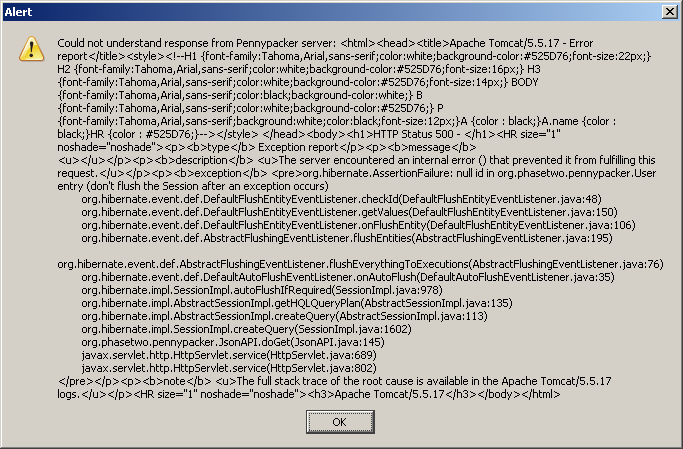
When the server that supports the excellent Pennypacker Penny-Arcade-indexing Firefox extension is down, the extension becomes unhappy.

It, then, serves you up with not one but two of these petite little beauties...

Pennypacker error

...every time you look at a PA comic page.

That's 683 by 449 pixels, folks.

And feel the quality!

1337 H4XX0rZ wanted!

It's great to see such impressive strides being made in the important field of protecting children from boobies.

Back in the day, there was software that confidently classified the Mona Lisa as porno. And also classified porno as being perfectly squeaky clean.

Nowadays, there's software on which my very favourite Australian Federal Government ever has apparently spent 84 million Australian dollars (about $US69 million, as I write this).

This software can, it is said, be bypassed by a kid in a matter of minutes.

(I see no reason to change my conclusion from the end of 2000: It doesn't matter, to the people who make it or the people who pay for it, whether censorware works or not.)

The news.com.au piece doesn't actually tell you how the pictured smirking 16-year-old bypassed the NetAlert suite of programs (while leaving them apparently running!). I presumed it was something rudimentary, like killing a couple of processes in Task Manager. Maybe a few seconds with regedit, too.

[UPDATE: As of 2012, that news.com.au page disappeared, in accordance with their ancient tradition; archive.org has it, but without the picture of the smirking teenager. The government Netalert site has been quietly led beghind the barn and shot in the head, too; here's how it looked when it was young and optimistic. Netalert-dot-COM-dot-au is alive and well, but it's not quite the same thing. I've had to archive.org-ify a few other pages, too.]

This ITWire piece details an inelegant way of temporarily and invisibly disbling Optenet, one of the three programs, by... killing a couple of processes in Task Manager.

This page mentions ways to prevent people from "tampering with Integard", which are hilarious enough that I'll leave them as a surprise, but which include not letting anybody boot the computer from CD.

That is, of course, well beyond the capabilities of the average parent (change boot order in BIOS setup program, set BIOS password, and then just hope your kid doesn't know how to clear the CMOS, which wipes the password and resets the boot order to default in one hit).

Just booting from BartPE or a Linux disc and nuking the nannyware isn't, of course, the sort of elegant and undetectable hack that's being advertised here. So there's probably something neater out there.

I'll be pretty surprised if you even need Process Explorer to nobble the rest of these marvellously enterprisey programs so wisely purchased from their skilled authors with my tax dollars. But who knows?

You mission, gentle readers, is to Outflank the Nanny, in as few keystrokes as possible. The software's a free download.

Our Government's dedication to quality software extends to the "Required" e-mail address and postcode on the download page. The postcode can be any four digits, and the e-mail address just needs to have an @ and a . in it, with two or three characters following the .

(The Safe Eyes download requires some kind of further account creation folderol. I also don't know whether they check to see if you've got an Australian-looking IP address.)

More SupCom eye candy

Flail Supreme, the Supreme Commander video clip I mentioned months ago, now has a sequel.

You're obviously missing out if you only watch the YouTube version. 1024 by 768 Xvid AVI version here, 512 by 384 version here.

I don't think the baby's face is that important

Apropos of my passing mention of that brilliant Hays/Efros scene completion technique, here's "Seam Carving", a very crafty image resizing technique:

PDF with more info here, home page with MOV version of video here.

(Via.)

If you wash my car, I'll give you some points!

I only yesterday got around to watching Luis von Ahn's excellent Google TechTalk from last year on Human Computation.

It's very interesting, though like totally the outside scoop, man, for people who follow the world of human-versus-computer data analysis.

I was pointed to it by comments on the Coding Horror post on whether Amazon's Mechanical Turk is a failure. Von Ahn's insight is that you don't have to pay people to do many seemingly tedious tasks which humans can do better than computers. If you can make a game of it, they'll do it for free.

The comments also, of course, point to von Ahn's The ESP Game, a perfect example of the theory in action in which anonymous pairs of people play a timed game of "Snap" in their attempts to type the same word when shown the same image, as a result creating a database of labels for those images.

Later on, there's a mention of Google Image Labeler, which is an exact (licensed) copy of The ESP Game. The difference is that Google Image Labeler appears to be working on the actual Google Images database. It's therefore doing real image-labelling work, as well as providing the entertainment that can only be gained when you boggle at your partner's apparent complete inability to recognise a picture of a shoe.

The ESP Game is more of a research tool, so it only works on a more controllable 30,000 image database. That database has to be about as well-labelled as it's ever going to get, by now.

(My own lame take on this idea is this piece. I don't think it'll be long before we see a game like Left 4 Dead or Natural Selection in which paying customers can play either side, but freeloaders can only be zombies/aliens/kobolds.)

While I'm linking to cool new information processing ideas that most of you dorks have probably already seen, allow me to highly recommend Scene Completion Using Millions of Photographs. The 11Mb PDF is well worth downloading.