The error message Olympics

The Error'd series on what-used-to-be-TheDailyWTF occasionally features some magnificently huge error boxes. I think the second one in this post has to be the record-holder: A standard Windows error box, 401 by 737 pixels in size.

I, however, quite often see one with 3.8% more area, and even less usefulness.

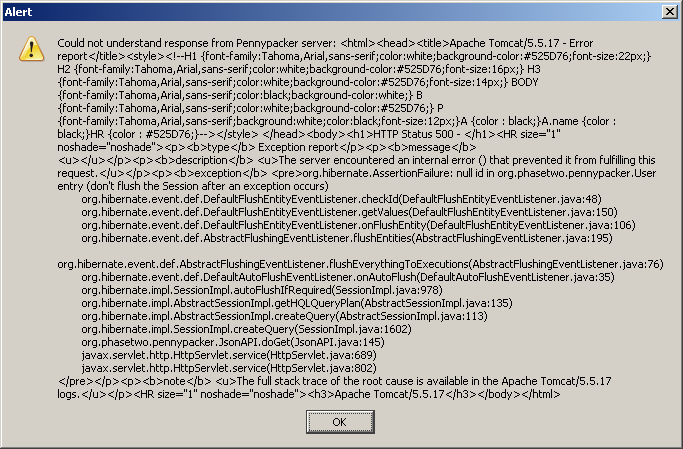
When the server that supports the excellent Pennypacker Penny-Arcade-indexing Firefox extension is down, the extension becomes unhappy.

It, then, serves you up with not one but two of these petite little beauties...

Pennypacker error

...every time you look at a PA comic page.

That's 683 by 449 pixels, folks.

And feel the quality!

1337 H4XX0rZ wanted!

It's great to see such impressive strides being made in the important field of protecting children from boobies.

Back in the day, there was software that confidently classified the Mona Lisa as porno. And also classified porno as being perfectly squeaky clean.

Nowadays, there's software on which my very favourite Australian Federal Government ever has apparently spent 84 million Australian dollars (about $US69 million, as I write this).

This software can, it is said, be bypassed by a kid in a matter of minutes.

(I see no reason to change my conclusion from the end of 2000: It doesn't matter, to the people who make it or the people who pay for it, whether censorware works or not.)

The news.com.au piece doesn't actually tell you how the pictured smirking 16-year-old bypassed the NetAlert suite of programs (while leaving them apparently running!). I presumed it was something rudimentary, like killing a couple of processes in Task Manager. Maybe a few seconds with regedit, too.

[UPDATE: As of 2012, that news.com.au page disappeared, in accordance with their ancient tradition; archive.org has it, but without the picture of the smirking teenager. The government Netalert site has been quietly led beghind the barn and shot in the head, too; here's how it looked when it was young and optimistic. Netalert-dot-COM-dot-au is alive and well, but it's not quite the same thing. I've had to archive.org-ify a few other pages, too.]

This ITWire piece details an inelegant way of temporarily and invisibly disbling Optenet, one of the three programs, by... killing a couple of processes in Task Manager.

This page mentions ways to prevent people from "tampering with Integard", which are hilarious enough that I'll leave them as a surprise, but which include not letting anybody boot the computer from CD.

That is, of course, well beyond the capabilities of the average parent (change boot order in BIOS setup program, set BIOS password, and then just hope your kid doesn't know how to clear the CMOS, which wipes the password and resets the boot order to default in one hit).

Just booting from BartPE or a Linux disc and nuking the nannyware isn't, of course, the sort of elegant and undetectable hack that's being advertised here. So there's probably something neater out there.

I'll be pretty surprised if you even need Process Explorer to nobble the rest of these marvellously enterprisey programs so wisely purchased from their skilled authors with my tax dollars. But who knows?

You mission, gentle readers, is to Outflank the Nanny, in as few keystrokes as possible. The software's a free download.

Our Government's dedication to quality software extends to the "Required" e-mail address and postcode on the download page. The postcode can be any four digits, and the e-mail address just needs to have an @ and a . in it, with two or three characters following the .

(The Safe Eyes download requires some kind of further account creation folderol. I also don't know whether they check to see if you've got an Australian-looking IP address.)

More SupCom eye candy

Flail Supreme, the Supreme Commander video clip I mentioned months ago, now has a sequel.

You're obviously missing out if you only watch the YouTube version. 1024 by 768 Xvid AVI version here, 512 by 384 version here.

I don't think the baby's face is that important

Apropos of my passing mention of that brilliant Hays/Efros scene completion technique, here's "Seam Carving", a very crafty image resizing technique:

PDF with more info here, home page with MOV version of video here.

(Via.)

If you wash my car, I'll give you some points!

I only yesterday got around to watching Luis von Ahn's excellent Google TechTalk from last year on Human Computation.

It's very interesting, though like totally the outside scoop, man, for people who follow the world of human-versus-computer data analysis.

I was pointed to it by comments on the Coding Horror post on whether Amazon's Mechanical Turk is a failure. Von Ahn's insight is that you don't have to pay people to do many seemingly tedious tasks which humans can do better than computers. If you can make a game of it, they'll do it for free.

The comments also, of course, point to von Ahn's The ESP Game, a perfect example of the theory in action in which anonymous pairs of people play a timed game of "Snap" in their attempts to type the same word when shown the same image, as a result creating a database of labels for those images.

Later on, there's a mention of Google Image Labeler, which is an exact (licensed) copy of The ESP Game. The difference is that Google Image Labeler appears to be working on the actual Google Images database. It's therefore doing real image-labelling work, as well as providing the entertainment that can only be gained when you boggle at your partner's apparent complete inability to recognise a picture of a shoe.

The ESP Game is more of a research tool, so it only works on a more controllable 30,000 image database. That database has to be about as well-labelled as it's ever going to get, by now.

(My own lame take on this idea is this piece. I don't think it'll be long before we see a game like Left 4 Dead or Natural Selection in which paying customers can play either side, but freeloaders can only be zombies/aliens/kobolds.)

While I'm linking to cool new information processing ideas that most of you dorks have probably already seen, allow me to highly recommend Scene Completion Using Millions of Photographs. The 11Mb PDF is well worth downloading.

The Blogcruft Elimination Project

This post on the bitter and twisted Coding Horror alerted me to two significant problems with this blog.

I had a Useless Calendar Widget, and no way for readers to figure out who the heck I was.

Both fixed now.

I'm pretty light on the rest of the Web 2.0 bingo stuff, but perhaps your own beautiful and unique snowflake of a blog is not.

(And actually, I always figured that Phil Greenspun punctuated his writing with random pictures just to make sure that his readers never forget how many photos he's taken of naked women.)

They seek config here, they seek config there...

My recent reinstall reacquainted me with the delightfully varied places in which Windows programs keep their configuration settings.

In the olden days, you knew where the config files were. Old DOS programs didn't necessarily have config info; you just gave 'em parameters on the command line, as the Great Beards intended.

When there were enough persistent settings to require separate configuration storage, you'd just have a text file called progname.cfg or something in the program directory. Easy.

Some programs still do this, even today. Blessed be the name of those programs, for you can often just run 'em from their directory and have everything work, whether or not you've ever run an installer for that program on your current Windows install.

But there are so many other places where Windows programs, in this modern age, may keep settings.

Some of them make their own directory in Documents and Settings\username\Local Settings\Application Data\, for instance.

Others use Documents and Settings\username\Application Data, just to keep you on your toes.

(Documents and Settings\username\Local Settings\Application Data also contains the XP IconCache.db file, deleting which can cure some weird icon problems. Or at least change them.)

And some programs, of course, tuck their settings away in the registry. Typically in some branch that'll have a different name when you reinstall, so you're thwarted even if you get all clever and "Export" that branch from regedit.

(I was quite proud of myself when I successfully edited the exported .reg file to put the settings for that one awkward program in the new long-nonsense-named registry branch.)

Some programs even decide to strike a blow for individualism by putting config files in the parched wasteland of My Documents. Cunning!

(Yes, I am aware that Mac OS X has one place where all of this stuff Must Be Kept, and Often Is. I agree unreservedly that just switching to a lovely trouble-free Mac would make settings transfer a great deal easier, by relieving me of many of the programs whose settings I would otherwise have to transfer, not to mention a substantial amount of the employment that so tiresomely requires me to use said applications.)

The whole installation-transfer adventure did have some bright patches. Some applications that look as if they ought to be a mass of horrible encrypted untransferable setting info actually aren't at all. Valve's "Steam" game download system, for instance, can trivially easily be ported from one Windows installation to another. Just install Steam on the new computer, then copy the (huge) steamapps folder from your old install to the new one. Done.

I even successfully exported and then re-imported the security certificates for the Australian-Government-issue Goods and Services Tax software, which isn't as legendarily bad as you might think but still doesn't inspire confidence that such a feat will actually be possible.

Oh - I'm also sure I'm not the first to be annoyed by all of the software companies who insist on making their install directory not Program Files\ThisProgram, but Program Files\CompuGlobalHyperMegaNet\ThisProgram, apparently because they assume you're going to be so impressed with ThisProgram that you'll buy a whole suite of other Compu-Global-Hyper-Mega-Net software, which must be kept in one directory for, um, neatness. Or something.

Later on, if you're trying to find the ThisProgram install directory (or even its entry on the Start menu, which will of course also be a company-named subdirectory), your eye will slide right over the CompuGlobalHyperMegaNet directory, because nobody outside CompuGlobalHyperMegaNet has any idea what the company is called.

The most outstanding example I've seen of this approach is from one Juan M. Aguirregabiria, whose programs, that's right, want to install themselves in Program Files\Juan M. Aguirregabiria\...

(And then the program of his that I tried had some DLL error or other and didn't even freakin' run.)
The Strange Case of the Unfreezing Wine

A reader writes:

I observed something I consider strange. I had a bottle of white wine which I didn't drink all of, and I decided to freeze the remnants for cooking purposes.

I put a shallow rectangular container in my deep freeze. Into this I put a plastic bag to line the container. Into the bag I poured the wine, which I then left to freeze.

I expected the wine to freeze into a rectangular prism approx 5 by 10 by 1 cm overnight - BUT THIS DIDN'T HAPPEN.

When I opened the freezer the next day, the wine was still liquid! As I watched (over about 20 seconds or so), crystals began to form inside the wine until it began to form an icy slurry.

The wine eventually froze solid after 2-3 days.

My freezer temperature is unknown, but it will freeze meat and water in about six hours.

Why didn't the wine freeze over 12 hours?

Why did it crystallise when it came in contact with the warmer air?

Sorry, it's probably more a Dr Karl question.

Mark

The wine stayed liquid because there were no nucleation points on the plastic with which you lined the tray.

It's possible to superchill water below zero Celsius and have it stay liquid, if there's nothing in contact with the water that provides a seed point from which crystallisation can proceed. This is also how those spiffy sodium acetate heating doodads work.

YouTube is positively packed with people's videos of this phenomenon.

The classic version of the experiment is to super-cool, then tap or shake, a sealed bottle of water:

(This is one of those experiments that's easier to do if you live somewhere where it gets decently cold in winter.)

More advanced experimenters can pour the water out, to make "ropelike peaks":

And, just like the acetate heaters, freezing supercooled water warms up when it freezes:

You can do the trick with beer, too...

...which adds a nifty multiple-starting-point effect, I presume because the nucleation points are little CO2 bubbles popping in and out of existence when you tap the bottle.

It wasn't the warmer air that started the crystallisation going; a speck of dust probably fell into the wine. An ice crystal from one of the shelves of the freezer would have done it, too. Or just agitation of the liquid.

The reason why it took so very long to freeze completely was probably just because there's some alcohol in it. Mixtures of water with any significant amount of alcohol will never freeze in a very satisfying way unless you chill them quite a lot more than the average freezer can manage. Most beer has little enough alcohol in it that its freezing point is only a few degrees below zero, but non-fortified wine already needs about -10 degrees Celsius to freeze, and stronger beverages are lower again.

This is why "frozen vodka" stays liquid, but starts to look sort of oily, as the water in it tries to solidify but the alcohol stays liquid. 40%-alcohol spirits will freeze at about -27 degrees C. Domestic freezers usually only give you about -18 degrees C.