Close-harmony disco

It occurs to me, apropos the aforementioned giant Nazi robot, that the perfect soundtrack for tired 'mech-jockeys whooping it up on the last night of leave before they saddle up their W-28s for the big push over the Rhine would be the Puppini Sisters' version of "I Will Survive".

(Via Metafilter, again.)

This choice of soundtrack would also alert the Doctor and his companion to the fact that they'd slipped into another alternate universe, so they wouldn't be taken unawares when a bunch of Gear Krieg/Ring Of Red action broke out in the area.

(Cap'n Jack'd be having a freakin' ball, of course.)

If you download only one 157Mb AVI file today...

...make it Code Guardian, from Cee-Gee (who're Italian, hence odd voice acting). Their download server is currently a melted lump, but there are mirrors.

Someone on the Metafilter thread about this video wondered where the British robot was.

Personally, I want to see the Soviet one, stonewalling the Wehrmacht at Stalingrad, long since out of ammo for all eight guns and just pounding on Panthers with a length of I-beam.

2010 UPDATE: In the time since this post first went up, the Cee-Gee site has fallen into a state of disrepair, and no longer has the clips available for download. You can, as of January 2010, still find the high-res version of Code Guardian here on ausgamers.com.

Mouse of champions

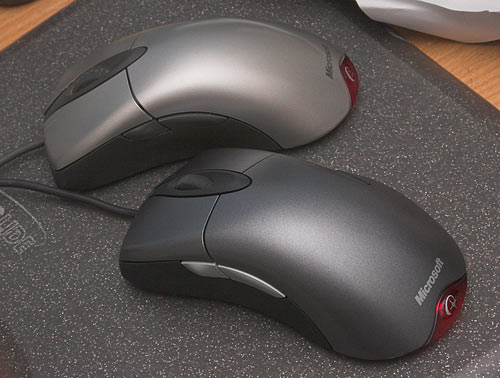
Microsoft's IntelliMouse Explorer 3.0 was, arguably, the best mouse a right-handed user could get when I reviewed it - and compared it with Logitech's show-off dual-pickup MouseMan Dual Optical - back in 2001.
Explorers old and new

And, as you may have heard, it has returned.

The final decision back in '01 came down to what shape you preferred, and left-handers were left out in the cold then, as they still pretty much are now.

But the Explorer 3.0 felt good to little old right-handed me, and it worked well. The two side thumb buttons are in just the right place, and the mouse feels neither too small nor too big. I like a teeny mouse for use with a laptop, when you often have a crummy wrist angle and need to hold the mouse with your fingertips from above to avoid strain injuries. But with an ergonomically correct desk setup, a big, though sculpted, mouse like this works for me. Perhaps I'm getting set in my ways in my old age, but I've kind of settled on the Explorer 3.0.

(I don't want a cordless mouse; yes, they work perfectly well these days, but I prefer a bit less weight and zero battery concerns. I keep my mouse cord organised with a simple weight, which you can readily make yourself; that may have something to do with the disappearance of the WireWeights company. More elaborate cord management contraptions are still on sale!)

Explorer 3s seem to last pretty well, too. My mouse gets a whole lot of use, but I can count on at least three years of service from an Explorer 3.0 before the cable goes flaky or the wheel starts mis-counting.

Microsoft were left behind in the feature-chart race, though. So they retired the 3.0, and created a new and awful version 4.0 of the Explorer.

This whole post is very much the outside scoop for gamers, of course, but the Explorer 4.0's suckage centred around its new and allegedly fantastic "tilt wheel", which you could not only roll up and down and click for the button-3 function, but could also tilt left and right for horizontal scrolling.

The tilt function made the click function hard to use, and they deleted the clicky detents in the wheel rotation that're essential when gamers want to accurately select a weapon.

So people who liked the old 3.0 started paying premiums for new old stock on eBay. Microsoft eventually noticed this, and reintroduced the older model.

Apparently the new Explorer 3 has a faster sensor chip in it, or something, but the change isn't significant enough that Microsoft bothered calling the new-old-mouse the Explorer 3.1. It is, for all practical intents and purposes, the same as the good old 3.0.

Except now, as you can see, it's dark slate-grey, with only slightly cheesy matte silver side buttons.

Here in Australia, m'verygoodfriends at Aus PC Market sell the new Explorer 3 for $AU69.30 including delivery anywhere in the country. Australian shoppers can click here to order one.

That's really not a bad price at all. Microsoft's fancy-pants Razer-collaboration Habu costs twice as much, and Logitech's flagship corded mouse, the G5, is not a lot cheaper.

Microsoft now seem to be calling the Explorer 4.0 just the "IntelliMouse Explorer", and OEM (no-fancy-box) versions of it can be had in the States for quite a bit less than the price of a new 3.0. At that price it's a perfectly OK desktop mouse, but it's still no good for many games. Aus PC Market have given up selling it.

Interestingly, Microsoft's main list of mice doesn't include the 3.0 at all any more. Look under "gaming products", though, and you can find it, next to the Habu.

The Explorer 4.0 tilt wheel also lives on in some even swoopier products. I'm not itching to try any of them, though.

Viva 2001!
Another monster board-scan

A reader took my lead on the polluting-Wikimedia-with-old-drive-circuit-boards idea, and came up with this most excellent image of a 44Mb MiniScribe's underside:

MiniScribe drive underside

(Now someone needs to slap an eight inch drive on an A3 scanner and make a really big file.)

Thanks to my Pocket PCRef, I know that the above drive is a 5.25 inch half height (which is to say, the same height as a modern optical drive) ST-506 3600RPM unit which reported 5 heads, 1024 cylinders and 17 sectors per track.

This information is, of course, almost perfectly useless these days, as is most of the rest of the content of even the current edition of Pocket PCRef (mine's the 1999 ninth edition). Connector pinouts and ASCII codes and such are all very well, but it's not as if all of those aren't at your fingertips anyway if you've got an Internet connection. The same goes for keyboard scan codes, paper sizes, number base conversion tables and error beep codes for various old BIOSes - though if you work with PC hardware every day, a Pocket PCRef will still probably help you out a few times a year.

More impressive is the original Pocket Ref, old editions of which are far less obsolete.

Pocket Ref has close to nothing about computers in it. It's more about every single piece of basic engineering information you'd need to reconstruct society after the inevitable happens, all in a very literally pocket-sized book.

Advertisement concludes.

Resistors 400 pixels long

Apropos my previous post about file hosting services, the perfect repository for at least some big files occurred to me.

Wikimedia Commons!

And so...

Circuit board scan

Behold!

It's a 1200dpi scan of a 5.25 inch hard drive controller board, from this scanner review from almost eight years ago. The board is of course rather older than that; it's from the days before surface mount (OK, nitpickers, before everything was surface mount), when electronics took up more room and looked much cooler.

That cheap little scanner did a quite commendable job. Not quite 1200 whole dots per inch of detail, but still a whole lot of it in this 66 megapixel (!) image. Which ought to be quite enough for anybody's desktop wallpaper.

If you've got some giant image, sound or video file that meets Wikimedia's rather loose requirements, you can upload it to the Commons and be reasonably sure that it'll be speedily available to the world for the foreseeable future.

The one caveat, of course, is that uploaded content must be covered by one or another free-use license. That rules Commons out for the 1337 w4r3z and pr0n that comprise most of the data uploaded to file-dump sites, unless you expend an unreasonable amount of effort in hiding your pirated content in something legit, and then hope they don't notice that myadorablekitten.jpg is 702Mb in size.

There are various other stock photo repositories out there; Morguefile is a good one, and you can share big images on Flickr as well if you pay for an account (otherwise the biggest dimension of your pictures is limited to 1024 pixels).

I thought I'd stick with the big guns for this image, though, because it's 12 freakin' megabytes.

(Actually, the original was even bigger. This is my second attempt - I uploaded the original untweaked scan first just to see if Wikimedia would barf on the file size, then made this prettier, slightly smaller version that benefits from some Photoshop features introduced over the last eight years. Since my Wikimedia account is younger than four days - Wikipedia and Wikimedia accounts are separate - I can't replace the old one with the new one, so I uploaded the new one as a separate file.)

Uploading your backups to FTP sites may be the really studly way to do it, but for this one niche - unreasonably large pictures of things that belong to you - Wikimedia looks pretty cool.

I hope to see many more scans of improbable objects there in the near future.

The storage appliance, not the guitar

David, from Western Australia, writes:

During my daily trawl across the more interesting places on the net, I encountered this little device, as I’m sure you have.

Naturally, I was interested... until I saw the bloody price. I could build my own happy little 1.5Tb RAID box for the cost of that thing and still have change left over.

But it did bring something to light. Its storage mechanism seems intriguing, for as much I like RAID, I hate sacrificing to the parity god, especially if I’m using 500Gb drives.

Which got me thinking. This Drobo thingummy seems to be an expansion of JBOD with some kind of parity calculator. Now granted, the implementation of this in a shiny box is reason you pay for this thing, however my question as it were is this:

Have you ever encountered a method of implementing this on a PC? I’ve done a bit of hunting and come up with squat, but I do remember you writing about JBOD related things on several occasions, so I turn to you as a font of knowledge, oh mighty Dan.

The Drobo box does indeed look like an interesting little thing, and certainly seems to be a step toward the home mega-storage Nirvana I've written about before. But it has its limitations, chief among which is exactly the same Parity God sacrifice you'd make with a do-it-yourself RAID rig.

If you only read the glossy main Web site, all you'll find is that the manufacturers allege that their storage scheme uses "advanced storage concepts such as virtualization, but it is not a derivative of RAID". Well, who knows what the heck it is, then, but it's clearly doing something analogous to parity RAID, otherwise it wouldn't be possible to yank a drive and upgrade it any time you liked. So, obviously, all of the data on any given disk must be reconstructable from the content of the other disks, and the amount of capacity offered up to the Parity God must be at least as much as the size of the biggest disk.

Drobo aren't really hiding this, though; their knowledge base confirms it. I suppose the thing could theoretically offer more capacity if it did real-time compression, but that'd make it hilariously slow and not gain much for the kinds of files that many Drobos are probably going to end up containing, anyway.

So if you add a 1000Gb drive to a Drobo that already has three 500Gb drives in it (ignoring real-gigabytes versus drive-manufacturer-gigabytes for now), you'll take your aggregate capacity from 1000Gb to 1500Gb. If you've got four 500Gb drives in your Drobo and swap one of them for a larger one, the actual capacity won't increase at all!

So I suppose it's basically working like RAID 4, but with support for dissimilar disks.

As with normal RAID, if you change the drive setup your Drobo may be churning away for hours. And, just like a rebuilding RAID array, a disk loss during this period will poleaxe the entire array. The Drobo does, however, have battery backup to prevent a mere mains interruption from clobbering your data. So you should factor the price of a UPS into your equivalent-PC calculations.

In answer to your actual question, no, I don't know of any remotely user-friendly way of doing this same sort of thing on a PC. FreeNAS could be a thing if you don't want to take the more traditional route of pirating a really expensive version of Windows, but plug-and-go it ain't.

Drobo really are quite straightforward about these capacity issues, though, including the powers-of-two versus powers-of-ten capacity rip-off. The knowledge base makes clear that four "500Gb" drives will only give you 1397 formatted gigabytes.

(It's also a neat hack that the thing reports 2Tb capacity no matter what drives you actually install in it.)

In answer to another of my immediate questions about the thing, it is also apparently possible to swap drives from a dead Drobo into a new one. But there is of course no way to read Drobo disks on anything else. Software RAID (and, in theory, quality hardware RAID controllers) gets around this vendor lock-in problem, but for home users it's not that big a deal, if of course you make backups. Which home users don't.

Oh, and as someone else has noticed, the Drobo site tagline currently says "whose" where it ought to say "who's". That's the kind of attention to detail you love to see from a storage vendor, isn't it?

It does explain the whistling

I-Wei's been busy lately.

"The remarkable thing about a dancing bear steam-powered radio-controlled R2-D2 is not how gracefully it dances..."

Recent Lego developments

This year's Lego sets will include some pretty nifty stuff. The stand-out for your average kid will, I hope, be the new Castle sets featuring such things as dudes firing flaming spears at undead horsemen (on undead horses!). But those of us who will not rest until we've faithfully reproduced a 100% self-aware Johnny Five in Technic will be intensely interested in the new tank-track pieces, to be seen in sets 8272 and 8275 (featuring IR remote control!).

The older, narrower black tracks, as seen in classic Technic sets like the 8851 Excavator and 856 Bulldozer, are relatively delicate, because their central chain part has to mesh with standard Technic gears. And they're not cheap, either - 15 cents a piece doesn't sound like much, until you realise that your fantasy crane or Shuttle Transporter or whatever needs sixty US bucks worth of treads even if you assume you're never going to break any of those dinky little hook connectors.

The new tracks, like the very old chain links that engaged the ancient peg gears, have a coarser drive gear pitch (and, therefore, new special drive gears), and should therefore be tougher.

But nobody really seems to care about that very much, because they've all immediately started perverting the new parts into weird and wonderful contraptions.

The heck of it is, though, that people keep coming up with brand new things to do with parts that've been around for ten or twenty years.

Like the old chain parts, for instance. Check this out. Do not miss the movie.

And, to give a more abstract example, how about spheres made out of radar dishes?

(This is from the same dude who came up with the most famous Lego sphere technique, which breaks free from the constraints of the obvious shape. It's been expanded into various creations by others.)

I can't quite pin down the exact part for the things on the bottom of the dish-sphere, by the way; they're close to these hair clips (I envy those who don't know about Lego's "girl products"...), but they're not the same.

A useful function for this clip has yet to be found. It slightly suggests a tentacular mouth.

Very Honourable Mention: This.