As I've mentioned before, ordinary everyday external USB hard disk boxes do not ever tell their drive to go into sleep mode.
How much harm this actually does is questionable, because spinning up hard drives causes motor electronics and bearing wear, just like running the drive all the time. There's doubtless some point on the duty cycle graph below which using sleep mode does more harm than good.
But since external drives are very seldom the main drive for a computer, they usually don't need to be spinning for a very large fraction of their lives. So they probably will last quite a lot longer, not to mention use less electricity and make less noise, if they're spun down when they're not needed.
But virtually no external boxes have that feature. They use cheap USB-to-ATA bridge hardware that can't do spin-down at all. There's no standard way to even send a spin-down message via USB (you can do it via FireWire) - but you could still use extra software, or just a little switch on the box, or something. But nobody does. You have to buy a NAS box if you want a sleep feature, which is overkill if all you need is a plain external drive.
If you want your external hard drive to stop spinning, you've got to turn off the box. For a lot of the cheap ones that means unplugging the power. Then the DC lead falls down behind the desk.
M'verygoodfriends at Aus PC Market, though, now have a cheap stopgap solution.
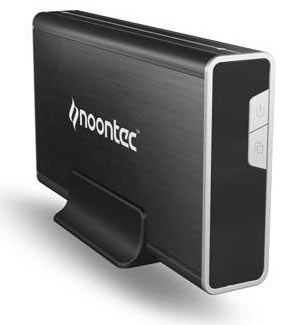
This box comes from international megabrand Noontec/BlueEye, whose Web site is as I write this not responding to hails.
(Readers outside Australia may find the same product being sold under yet another weird name, by a company that may even have a working Web site!)
The box has a few points in its favour.
One: It's cheap. $AU77 without a drive, including delivery anywhere in Australia.
Two: It accepts SATA drives, up to 500Gb in capacity. No good if you want to use an old PATA drive, but new SATA drives are now often cheaper than new PATA ones.
Three: It turns off when it loses USB signal, either because the host computer has shut down or because its data cable has been unplugged.
The box also has a simple power button on the front. That'd be a selling point all by itself, since it means you don't have to fumble around the back of the thing to shut it down.
The automatic power-down function is not, regrettably, matched by an automatic power-up function when you turn your computer back on again. You have to power the box up manually. Just poking the power button is not a huge chore, though, and for my money it definitely beats coming back to your computer after a weekend away and discovering that while the PC's been off all that time, the bloody external drive you forgot to unplug has been spinning for sixty completely pointless hours.
There's a second button on the front of the box, that runs some automatic backup software of unknown quality. You may find that useful. If you don't (or aren't running Windows), just don't install the software and the button will be harmless.
The Noontec box is made out of aluminium, so it ought to get decent convective cooling if you set it up vertically in the supplied stand. Any 7200RPM drive should be OK in it, if you don't live in a tropical jungle.
If this box cost $AU150 or something, I'd find it hard to recommend. For $AU77 delivered, though, its convenience features make it a winner. It even comes with a padded bag!
Australian shoppers can click here to order it from Aus PC Market.